Event Delegation and Event Bubbling in JavaScript
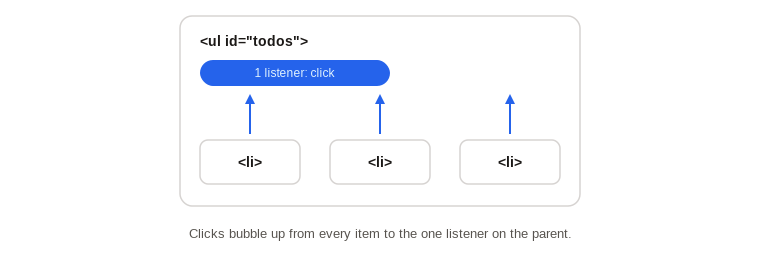
Event delegation is a technique where you attach one event listener to a parent element instead of attaching one to every child. It works because of event bubbling: when something happens to an element, the event travels up through its ancestors, so the parent can handle it.
Why it exists
Say you have a to-do list, and you want to do something when the user clicks an item:
document.querySelectorAll('#todos li').forEach((li) => {
  li.addEventListener('click', () => li.classList.toggle('done'));
});
This works, but it has two problems:
- With 1,000 items you create 1,000 listeners.
- Items added later (say, after the user types a new to-do) have no listener, so clicking them does nothing.
Delegation fixes both with a single listener on the <ul>. To see how, we first need to understand how an event travels through the page.
How events travel: capturing, target, bubbling
When you click a button, the browser doesn't only tell the button. The event makes a round trip through the DOM tree:
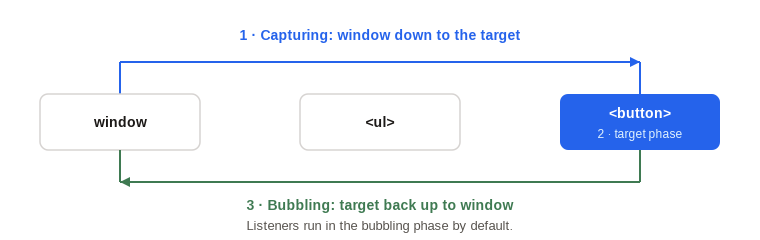
- Capturing phase: the event goes down from
windowtoward the element you clicked. - Target phase: the event reaches the clicked element.
- Bubbling phase: the event goes back up, from the target to
window.
Think of dropping a pebble into a pond and watching the ripples move outward. The pebble lands on one spot (the target), but the ripples reach everything around it.
By default, addEventListener listens during the bubbling phase. If you want the capturing phase instead, pass true or { capture: true } as the third argument:
parent.addEventListener('click', handler);                   // bubbling (default)
parent.addEventListener('click', handler, { capture: true }); // capturing
How event delegation works
Because the click bubbles up, a listener on the <ul> hears clicks on every <li> inside it:
const list = document.querySelector('#todos');

list.addEventListener('click', (event) => {
  const item = event.target.closest('li');
  if (!item || !list.contains(item)) return; // click wasn't on an item

  item.classList.toggle('done');
});
Step by step:
- The user clicks an
<li>. The event bubbles up to the<ul>. - Our one listener runs.
event.targettells us which element was actually clicked. closest('li')walks up from the target and returns the nearest<li>(or the target itself, if it is one). If the click wasn't inside an item, it returnsnulland we stop.list.contains(item)makes sure the item belongs to this list. It matters when lists are nested.
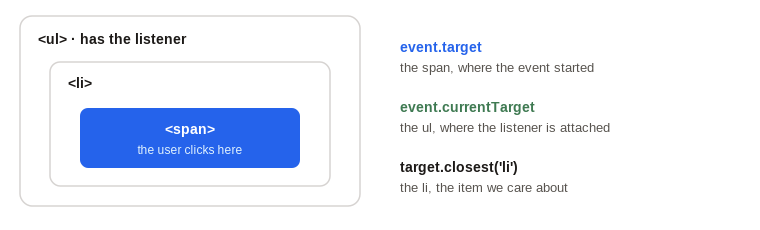
Why closest() and not just event.target? If your item contains other elements, like <li><span>Buy milk</span></li>, the user may click the <span>, and then event.target is the span, not the <li>. closest() handles that for you.
New items work automatically, since the listener lives on the parent, which is always there.
target vs currentTarget
These two properties are the most common source of confusion:
| Property | Meaning | In our example |
|---|---|---|
event.target | The element where the event started | The <li> (or the <span> inside it) |
event.currentTarget | The element the listener is attached to | The <ul> |
target stays the same while the event travels. currentTarget changes as the event passes each element that has a listener. Delegation relies on target to find the source. Also, this inside a regular function listener equals currentTarget. Arrow functions don't have their own this, so use event.currentTarget there. (See this keyword.)
Stopping events: stopPropagation, stopImmediatePropagation, preventDefault
These three are often mixed up, but they do different jobs:
| Method | What it does |
|---|---|
event.stopPropagation() | Stops the event from moving on to other elements. Other listeners on the same element still run. |
event.stopImmediatePropagation() | Same, and also stops the remaining listeners on the same element. |
event.preventDefault() | Cancels the browser's default action (following a link, submitting a form). The event still propagates. |
link.addEventListener('click', (event) => {
  event.preventDefault();   // don't navigate
  // the event still bubbles to parents
});
Events that don't bubble
Not every event bubbles. The common ones that don't are focus, blur, mouseenter and mouseleave. A delegated listener for them on a parent will never fire from a child, with the default settings. There are two ways around it:
| Doesn't bubble | Alternative |
|---|---|
focus | focusin (bubbles), or listen with { capture: true } |
blur | focusout (bubbles), or listen with { capture: true } |
mouseenter / mouseleave | mouseover / mouseout (bubble) |
form.addEventListener('focusin', (event) => {
  event.target.classList.add('is-focused');
});
form.addEventListener('focusout', (event) => {
  event.target.classList.remove('is-focused');
});
You can check any event with event.bubbles: it's true when the event bubbles.
Examples
1. A button list with data attributes
<div id="toolbar">
  <button data-action="save">Save</button>
  <button data-action="delete">Delete</button>
</div>
const actions = {
  save: () => console.log('saving'),
  delete: () => console.log('deleting'),
};

document.querySelector('#toolbar').addEventListener('click', (event) => {
  const button = event.target.closest('button[data-action]');
  if (!button) return;
  actions[button.dataset.action]();
});
One listener, any number of buttons, and you add a new action by adding an entry to the object.
2. Items added later
Problem: you add a new <li> with JavaScript and clicking it does nothing.
Why: the listeners were attached once, to the items that existed at that time. The new item has none.
Fix: move the listener to the parent, as in the main example. It handles every item, old or new.
3. A click that "disappears"
Problem: a delegated click handler on document never runs for a particular button.
Why: some code on or near that button calls event.stopPropagation(), so the event never bubbles up to document.
Fix: find and remove the stopPropagation() call, or listen in the capture phase ({ capture: true }), which runs before any bubbling code can stop the event.
4. Delegation isn't free
Problem: the handler runs for every click inside a huge container, even when the user clicks something irrelevant.
Why: delegation catches all clicks inside the parent.
Fix: exit early. Check with closest() and return if nothing matches, and attach the listener to the closest sensible parent, not to document.
When not to use delegation
- The event doesn't bubble and there's no bubbling alternative.
- You have one or two elements. A direct listener is simpler.
- In React, you usually don't need it: React attaches its handlers for you, so write
onClickon each element.
Interview answer
Event delegation means attaching a single listener to a parent element and letting events from its children bubble up to it. Inside the handler, I use event.target, usually with closest(), to find which child triggered the event. It saves memory because there are fewer listeners, and it works for elements added later. It doesn't work for events that don't bubble, like focus and blur, where I would use focusin and focusout instead.
Summary
- Events travel in three phases: capturing (down), target, bubbling (up).
addEventListenerlistens in the bubbling phase by default. Use{ capture: true }for capturing.- Event delegation is one listener on a parent, handling events from many children.
- Use
event.target.closest(selector)to find the element you care about. event.targetis where the event started.event.currentTargetis where the listener is attached.- Delegation uses fewer listeners and works for elements added later.
stopPropagation()stops travel to other elements.preventDefault()cancels the default action. They are independent.stopImmediatePropagation()also stops other listeners on the same element.focus,blur,mouseenterandmouseleavedon't bubble. Usefocusin,focusout,mouseoverandmouseout.- Avoid
stopPropagation()unless you need it, because it breaks delegated handlers higher up.