null vs undefined in JavaScript: What's the Difference?
In JavaScript, undefined means "no value has been assigned yet", and null means "this is deliberately empty". Both are primitive values that mean "nothing", but undefined usually comes from the language itself, while null is something a person (or an API) puts there on purpose.
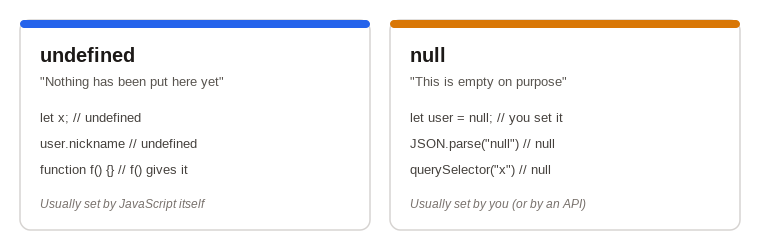
Why are there two kinds of "nothing"?
Imagine a form with a "Middle name" field. There are two very different situations:
- The user hasn't filled it in yet. We don't know anything.
- The user has no middle name and told us so. We know it's empty.
Those two situations deserve different answers, and JavaScript gives you one word for each. undefined is the first situation ("nobody has said anything"). null is the second ("someone said: nothing here").
Where undefined comes from
You rarely write undefined yourself. JavaScript produces it in a few places:
let x;                    // declared, never assigned
console.log(x);           // undefined

const user = { name: "Ana" };
console.log(user.age);    // undefined: the property doesn't exist

function greet(name) {
  console.log(name);
}
greet();                  // undefined: no argument was passed

function noReturn() {}
console.log(noReturn());  // undefined: no return statement

const [first] = [];
console.log(first);       // undefined: nothing at index 0
In all of these, JavaScript is saying: "I looked for a value and found nothing."
Where null comes from
null is an assignment. You write it when you want to say "empty, on purpose":
let selectedUser = null;   // nobody is selected yet

const el = document.querySelector(".missing");
console.log(el);           // null: the DOM API says "no match"
Many built-in APIs return null for "searched, found nothing", like querySelector, getElementById and localStorage.getItem.
Side by side
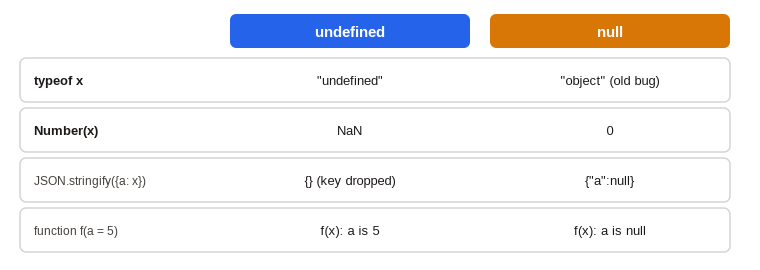
Let's go through the rows one by one.
typeof
typeof undefined; // "undefined"
typeof null;      // "object"  (!)
typeof null returning "object" is a famous mistake from the very first version of JavaScript. It was never fixed, because fixing it would break old websites. null is not an object. To check for it, compare directly:
if (value === null) { /* ... */ }
Both are falsy
Boolean(null);      // false
Boolean(undefined); // false
So if (!value) is true for both. But it is also true for 0, "", false and NaN, which is where bugs start. We'll see that in a moment.
Converting to a number
Number(undefined); // NaN
Number(null);      // 0
This is a classic trap: null + 1 is 1, but undefined + 1 is NaN.
Default parameters
function greet(name = "friend") {
  return `Hello, ${name}`;
}

greet(undefined); // "Hello, friend"
greet(null);      // "Hello, null"
A default value kicks in only for undefined. Passing null counts as "I really meant empty", so the default is not used.
JSON
JSON.stringify({ a: undefined, b: null });
// '{"b":null}'
undefined properties are dropped when you convert an object to JSON, while null is kept. That matters when you send data to an API: a field you "cleared" with null arrives, but a field set to undefined silently disappears.
== vs ===
This is the most common interview follow-up.
null == undefined;   // true
null === undefined;  // false
The strict operator === compares type and value. null and undefined are different types, so the result is false. The loose operator == has a special rule: null and undefined are equal to each other and to nothing else.
null == 0;          // false
null == "";         // false
undefined == false; // false
This special rule gives you a handy shortcut. value == null checks for both at once:
if (value == null) {
  // value is null OR undefined
}
Many style guides forbid == everywhere, and some make an exception just for this one pattern. Whichever you follow, make sure you know what it does when you read it in someone else's code.
?? vs ||: choosing a default
A very common job is "use this value, or a default if it's missing". The old way is ||:
const volume = settings.volume || 50;
It works until the user sets the volume to 0. Since 0 is falsy, || throws it away and you get 50. The newer nullish coalescing operator ?? fixes this by only reacting to null and undefined:
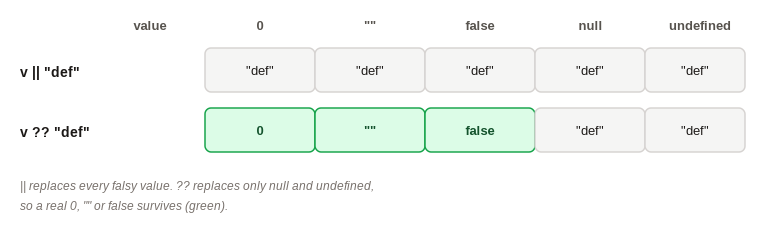
const volume = settings.volume ?? 50;
// 0 stays 0, "" stays "", false stays false
// only null and undefined become 50
Optional chaining
Reading a property of null or undefined crashes:
const user = null;
console.log(user.name); // TypeError
The optional chaining operator ?. stops and returns undefined if the thing on its left is null or undefined:
console.log(user?.name);            // undefined, no crash
console.log(user?.address?.city);   // safe for deep paths
console.log(user?.name ?? "Guest"); // combine with ??
Notice that ?. always gives back undefined, even when the thing on the left was null.
Examples
1. A volume setting that resets to 50
function getVolume(settings) {
  return settings.volume || 50;
}
Problem: a user mutes the app (volume: 0), but it jumps back to 50.
Why: 0 is falsy, so || treats it as "missing".
Fix: use ??, which only replaces null and undefined.
return settings.volume ?? 50;
2. A default that is ignored
function createUser(name, role = "viewer") {
  return { name, role };
}

createUser("Ana", null); // { name: "Ana", role: null }
Problem: the user ends up with no role, even though we wrote a default.
Why: default parameters only apply to undefined, not to null.
Fix: if null should also fall back, handle it inside the function.
function createUser(name, role) {
  return { name, role: role ?? "viewer" };
}
3. A cleared field that never reaches the server
const update = { nickname: undefined };
await fetch("/api/profile", {
  method: "PATCH",
  body: JSON.stringify(update),
});
Problem: the user cleared their nickname, but the server still has the old one.
Why: JSON.stringify drops properties whose value is undefined, so the server never saw the field.
Fix: send null when you mean "clear this".
const update = { nickname: null };
4. typeof null in a type check
function isObject(value) {
  return typeof value === "object";
}

isObject(null); // true (!)
Problem: null passes the check, and the next line value.id crashes.
Why: typeof null is "object".
Fix: exclude null explicitly.
function isObject(value) {
  return typeof value === "object" && value !== null;
}
Which one should you use?
There's no official rule, so pick a convention and be consistent. A common and easy one:
- Let JavaScript produce
undefinedfor "missing" or "not set yet". - Use
nullwhen you want to say "there is deliberately no value", such as aselectedUserbefore anyone is selected. - Avoid assigning
undefinedyourself, because it blurs the line between "never set" and "explicitly cleared".
In TypeScript, you can describe both explicitly, for example string | null or name?: string. If you use type vs interface in a codebase like this, the same convention applies.
Interview answer
undefinedmeans a variable or property has no value assigned. JavaScript sets it automatically for uninitialized variables, missing properties and functions without a return value.nullis an intentional "empty" value that a developer assigns. Both are falsy primitives,null == undefinedis true butnull === undefinedis false, andtypeof nullreturns "object" because of a historical bug. For defaults,??only replaces null and undefined, while||replaces every falsy value.
Summary
undefined= "no value assigned yet". JavaScript sets it for you.null= "deliberately empty". You set it.- Both are primitives and both are falsy.
typeof undefinedis"undefined", buttypeof nullis"object", a historical bug. Check with=== null.null == undefinedistrue,null === undefinedisfalse.value == nullchecks for both.Number(null)is0,Number(undefined)isNaN.- Default parameters apply only to
undefined, not tonull. JSON.stringifydropsundefinedproperties and keepsnull.??replaces onlynullandundefined.||replaces every falsy value.?.safely reads throughnullorundefinedand returnsundefined.- Pick one convention for your team and stick to it.