Shallow Copy vs Deep Copy in JavaScript
A shallow copy duplicates only the top level of an object, so any nested objects are still shared with the original. A deep copy duplicates every level, so the copy and the original share nothing and can change independently.
Why copies are tricky
When I first learned this, I assumed that copying an object gave me a new, separate object. Let's test that:
const original = { name: "Ada", address: { city: "Paris" } };
const copy = { ...original };

copy.name = "Grace";
copy.address.city = "London";

console.log(original.name);         // "Ada"
console.log(original.address.city); // "London" (surprise!)
The name stayed the same, but the city changed in the original too. The copy is only half separate. To see why, we need to look at how JavaScript stores values.
The idea: values vs references
JavaScript stores two kinds of data differently:
- Primitives (strings, numbers, booleans,
null,undefined) are stored directly. Copying one gives you an independent value. - Objects (plain objects, arrays, dates, maps) live somewhere in memory, and a variable holds a reference, which is like an address pointing to that place.
When you copy an object property that holds another object, you copy the address, not the thing it points to. Now two properties point at the same object. If you want a refresher, see pass by value and reference.
What a shallow copy does
A shallow copy walks through the top-level properties and copies each one. Primitives are copied as values. Objects are copied as references.
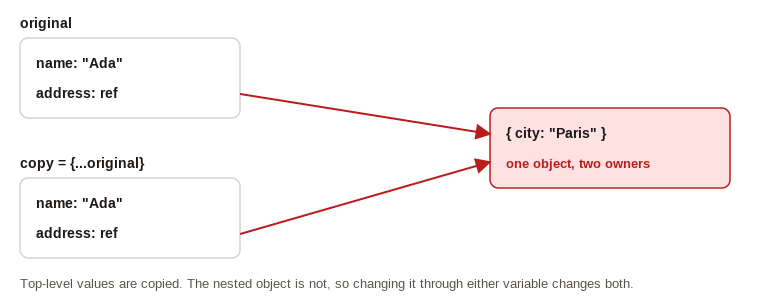
In the diagram, name is a separate string in each object, but both address properties point to the same { city: "Paris" } object. Change it through one variable and the other one sees it.
These common tools all make shallow copies:
| Tool | Example |
|---|---|
| Object spread | { ...obj } |
Object.assign | Object.assign({}, obj) |
| Array spread | [...arr] |
slice | arr.slice() |
Array.from | Array.from(arr) |
concat | arr.concat() |
A shallow copy is not wrong. It's fast, and it's exactly what you want when the object is flat, or when you replace nested parts instead of mutating them (more on that below).
What a deep copy does
A deep copy keeps going. Whenever it meets a nested object or array, it creates a brand-new one and copies its contents too, all the way down.
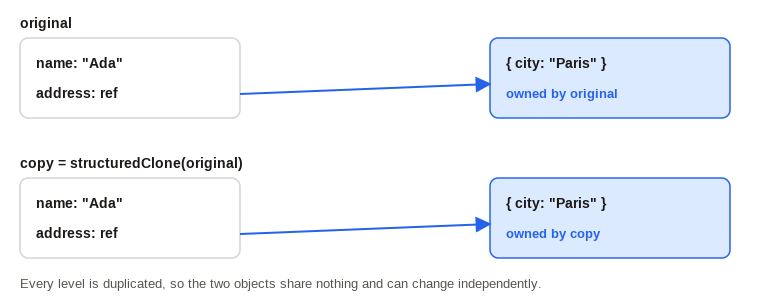
Now each variable owns its own address. Changing copy.address.city can't touch the original.
How to deep copy in JavaScript
1. structuredClone() (the modern answer)
structuredClone is a built-in function available in modern browsers and in Node.js (version 17 and later).
const original = {
  name: "Ada",
  born: new Date("1815-12-10"),
  tags: new Set(["math", "code"]),
  address: { city: "Paris" },
};

const copy = structuredClone(original);

copy.address.city = "London";
copy.tags.add("poetry");

console.log(original.address.city); // "Paris"
console.log(original.tags.size);    // 2
console.log(copy.born instanceof Date); // true
It handles Dates, Maps, Sets, typed arrays and circular references (an object that points back at itself). Its limits:
- It throws a
DataCloneErrorif the data contains a function. - It can't clone DOM nodes either.
- It doesn't copy the prototype chain, so a class instance comes back as a plain object and loses its methods.
- Getters, setters and property descriptors aren't preserved.
2. JSON.parse(JSON.stringify(obj)) (the old trick)
For years this was the standard one-liner:
const copy = JSON.parse(JSON.stringify(original));
It works for plain data, but it first turns your object into a string and then parses it back. Anything JSON can't express is lost or changed:
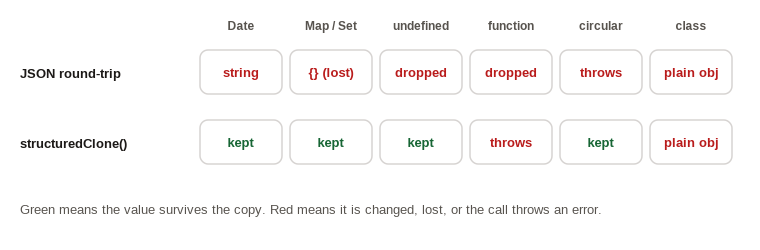
Datebecomes an ISO string, not a Date.MapandSetbecome{}.undefinedand functions are dropped from objects (and becomenullinside arrays).- A circular reference throws a
TypeError.
3. Write it yourself (recursion)
Interviewers love this one. The idea: if the value is a primitive, return it. If it's an array or object, create a new one and copy each child with the same function.
function deepClone(value, seen = new WeakMap()) {
  if (value === null || typeof value !== "object") return value;
  if (seen.has(value)) return seen.get(value); // handles circular refs

  const result = Array.isArray(value) ? [] : {};
  seen.set(value, result);

  for (const key of Object.keys(value)) {
    result[key] = deepClone(value[key], seen);
  }
  return result;
}
The WeakMap remembers objects we've already copied, which stops infinite loops on circular data. This simple version ignores Dates, Maps and Sets. You can practice the full version in the deep clone problem.
Examples
1. Mutating state through a shallow copy
const state = { user: { name: "Ada" }, count: 0 };
const next = { ...state };
next.user.name = "Grace";
Problem: state.user.name is now "Grace" as well.
Why: the spread copied the reference to user, so both objects share it.
Fix: copy the level you change. You don't need a full deep copy:
const next = { ...state, user: { ...state.user, name: "Grace" } };
This is how immutable updates in React state work: copy only the path you change, and reuse the rest.
2. Cloning data that contains a Date
const copy = JSON.parse(JSON.stringify({ createdAt: new Date() }));
copy.createdAt.getFullYear(); // TypeError
Problem: getFullYear is not a function.
Why: the JSON round-trip turned the Date into a string.
Fix: use structuredClone, which keeps the value a real Date.
3. Cloning a class instance
class User {
  constructor(name) { this.name = name; }
  greet() { return `Hi, ${this.name}`; }
}

const copy = structuredClone(new User("Ada"));
copy.greet(); // TypeError
Problem: the copy has no greet method.
Why: structuredClone doesn't copy the prototype chain, so the result is a plain object.
Fix: rebuild the instance, for example with Object.assign(new User(), copy), or write a clone() method on the class.
Which one should I use?
- Flat object, or replacing nested parts: spread.
- Plain data with Dates, Maps, Sets or cycles:
structuredClone. - Data with functions or class instances: a custom clone function or a library.
- Plain JSON data and you want JSON semantics: the JSON round-trip is fine.
Also remember that a deep copy costs time and memory. Don't deep copy large objects on every update when a shallow copy of the changed path would do.
Interview answer
A shallow copy copies only the top level of an object, so nested objects are still shared by reference with the original. A deep copy recursively duplicates every level, so the two never share anything. Spread,
Object.assign,sliceandArray.fromare shallow. For deep copies I usestructuredClone, which handles Dates, Maps, Sets and circular references but throws on functions and drops class prototypes.JSON.parse(JSON.stringify())also works for plain data, but it turns Dates into strings and dropsundefinedand functions.
Summary
- A shallow copy duplicates the top level only. Nested objects are shared.
- A deep copy duplicates every level. Nothing is shared.
- Primitives are copied by value. Objects are copied by reference.
- Spread,
Object.assign,slice,concatandArray.fromare all shallow. structuredClone()is the built-in way to deep copy.structuredClonehandles Dates, Maps, Sets and circular references.structuredClonethrows on functions and returns plain objects for class instances.JSON.parse(JSON.stringify())converts Dates to strings and losesundefined, functions, Maps and Sets.- For immutable updates, copy only the path you change instead of deep copying everything.
- A custom recursive clone needs a
WeakMapto survive circular references.