CSS Specificity: How the Browser Picks a Winner
CSS specificity is the score the browser uses to decide which rule wins when several rules set the same property on the same element. The more precisely a selector points at an element, the higher its score.
Why it exists
Imagine two rules that both want to color the same link:
<aside id="sidebar">
  <a class="button" href="/signup">Sign up</a>
</aside>
#sidebar a { color: blue; }
.button    { color: red; }
Both selectors match the link, and the link can only have one color. The browser needs a rule for picking one, and it doesn't care which rule you think is more important. It compares how specific each selector is.
Here the link turns blue, even though .button comes later. If you open DevTools, you'll see color: red crossed out. To understand why, we need to see how the browser scores a selector.
The idea: precise selectors win
Think about how many elements each kind of selector can point at:
- An ID (
#sidebar) points at exactly one element on the page. That's very precise. - A class (
.button) points at a group of elements, the ones that have that class. - An element name (
a) points at every link on the page. That's very broad.
CSS rewards precision. An ID is worth more than a class, and a class is worth more than an element name. That's the whole intuition behind specificity. The rest is just counting.
How to calculate specificity
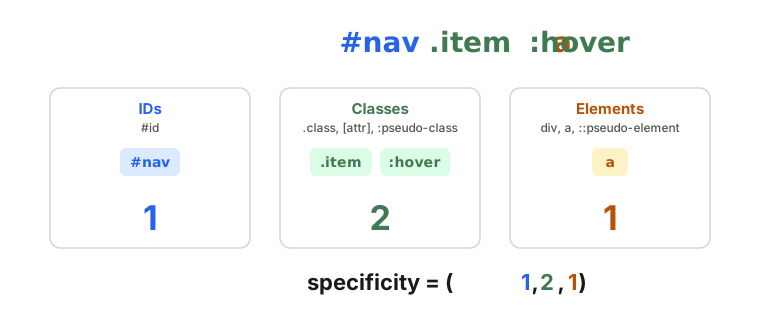
The browser sorts every piece of a selector into one of three buckets:
| Bucket | What goes in it | Examples |
|---|---|---|
| IDs | Anything starting with # | #nav, #sidebar |
| Classes | Classes, attribute selectors, and pseudo-classes (states like hover or focus, written with one colon) | .item, [type="email"], :hover, :first-child |
| Elements | Tag names, and pseudo-elements (parts of an element, written with two colons) | a, div, li, ::before, ::placeholder |
Then it counts how many pieces landed in each bucket and writes the result as three numbers: (IDs, Classes, Elements).
Walking through an example
Let's score #nav .item a:hover step by step. Read it left to right and split it into pieces:
| Piece | What it is | Bucket |
|---|---|---|
#nav | an ID | IDs |
.item | a class | Classes |
a | an element | Elements |
:hover | a pseudo-class (a state) | Classes |
Now count each bucket: 1 ID, 2 classes, 1 element. The specificity is (1, 2, 1).
Notice that the spaces between the pieces weren't counted. A space just means "inside of", and these connectors (called combinators: space, >, + and ~) never add anything. The same goes for the universal selector *, which matches everything and so isn't specific at all.
More examples
| Selector | Pieces | Specificity |
|---|---|---|
p | 1 element | (0, 0, 1) |
ul li | 2 elements | (0, 0, 2) |
.card | 1 class | (0, 1, 0) |
.card p | 1 class, 1 element | (0, 1, 1) |
input[type="email"] | 1 attribute, 1 element | (0, 1, 1) |
.nav li:first-child | 2 classes (.nav, :first-child), 1 element | (0, 2, 1) |
#header .logo | 1 ID, 1 class | (1, 1, 0) |
a::after | 2 elements (a, ::after) | (0, 0, 2) |
* | nothing counted | (0, 0, 0) |
Back to our link: #sidebar a is (1, 0, 1) and .button is (0, 1, 0). Now let's see how the browser compares them.
Comparing two scores
Think of a medal table at the Olympics. Countries are ranked by gold medals first. Silver medals only matter if two countries have the same number of golds, and bronze only matters if gold and silver are both tied.
Specificity works exactly the same way: IDs are gold, classes are silver, elements are bronze.
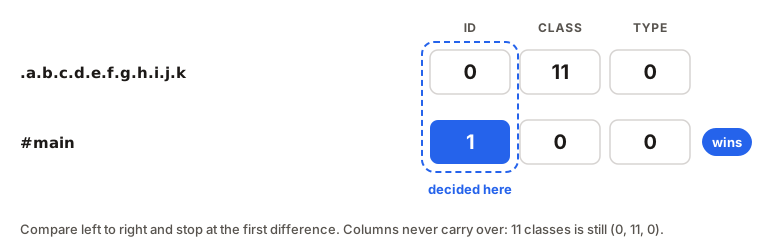
- Compare the ID counts. If one is higher, that selector wins. Done.
- If they're equal, compare the class counts.
- If those are equal too, compare the element counts.
- If everything is equal, the rule that appears last in the CSS wins.
So in our example, #sidebar a has one "gold" and .button has none. The browser doesn't even look at the other columns: blue wins.
This also explains a common surprise. Some tutorials say "IDs are worth 100 points, classes 10, elements 1" and add them up. That suggests 11 classes (110) would beat one ID (100). They don't, just like 11 silver medals don't beat one gold. The columns never carry over into each other.
Quick quiz
Try these before opening the answers.
/* 1 */
ul li { color: red; }
li    { color: blue; }

/* 2 */
.btn.primary { color: red; }
.primary.btn { color: blue; }
Answers
- Red.
ul liis (0, 0, 2) andliis (0, 0, 1). The order doesn't matter, because the scores already differ. - Blue. Both are (0, 2, 0), a tie, so the rule that comes later wins.
Specificity is only one step
Here's something that surprises a lot of people: specificity isn't the first thing the browser checks. It's one step in a longer process called the cascade. The browser goes down this list and stops at the first step that picks a winner:
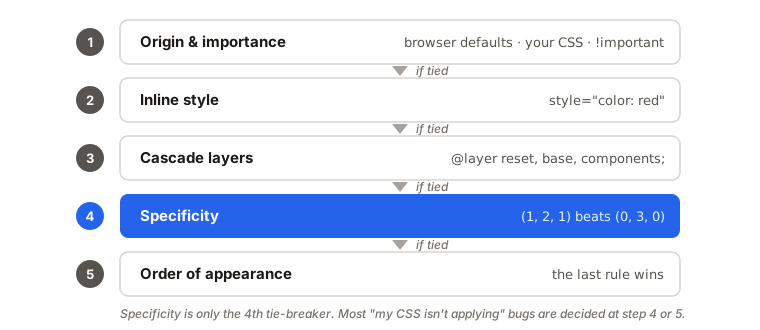
In practice, three things in that list cause most of the confusion:
!important doesn't add specificity. It moves the rule into a separate, higher-priority group that's checked before specificity. If two rules both use !important, they're back in the same group and compete on specificity as usual. That's how codebases end up in an "!important arms race".
Inline styles beat any selector. A style="..." attribute in the HTML wins over everything in your stylesheet (except !important).
Inherited values have no specificity at all. Some properties, like color and font-size, pass down from a parent to its children. But an inherited value always loses to any rule that targets the element directly:
#article { color: red; }   /* applies to #article itself */
p        { color: black; } /* applies to the paragraphs directly */
Paragraphs inside #article are black. The red only reaches them through inheritance, and inheritance loses to a direct match, no matter how high the parent's specificity is.
:is() vs :where()
These are newer selectors that let you group several selectors into one. They look the same but score very differently.
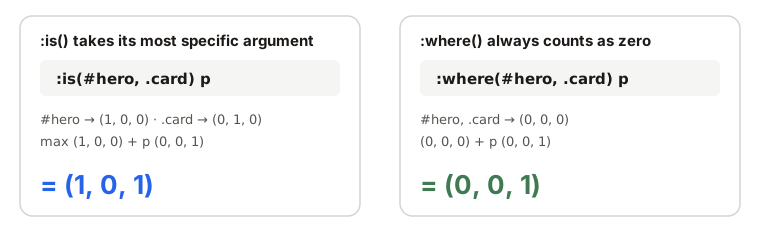
:is()(and also:not()and:has()) takes the score of the most specific selector inside it.:is(#hero, .card) pcounts as if it had an ID, even when the element it matched is just a.card.:where()always counts as zero, whatever is inside it.
That makes :where() perfect for default styles that you want to be easy to override, like a CSS reset:
/* scores (0, 0, 0), so any class can override it */
:where(ul, ol)[role="list"] {
  list-style: none;
  padding: 0;
}
Cascade layers
@layer lets you put CSS into named groups and decide which group wins. A later layer beats an earlier one regardless of specificity:
@layer vendor, components;  /* components wins over vendor */

@layer vendor {
  #picker .day.selected { background: gray; }  /* (1, 2, 0) */
}

@layer components {
  .day { background: teal; }  /* (0, 1, 0), but wins */
}
This is very useful for taming third-party CSS. Two things to remember: CSS that's not in any layer beats all layered CSS, and !important reverses the layer order.
Examples
1. A hover style that never shows
.nav a        { color: gray; }   /* (0, 1, 1) */
a:hover       { color: black; }  /* (0, 1, 1) */
.nav a.active { color: blue; }   /* (0, 2, 1) */
Problem: hovering the active link does nothing.
Why: .nav a.active scores (0, 2, 1), higher than a:hover at (0, 1, 1).
Fix: write the hover rule as .nav a:hover. Now it also scores (0, 2, 1), and if you place it after .active, it wins the tie.
2. Overriding a UI library
/* the library's CSS */
.lib-modal .lib-header h2 { font-size: 24px; }  /* (0, 2, 1) */

/* your CSS: doesn't work */
.modal-title { font-size: 18px; }               /* (0, 1, 0) */
Problem: the library's selector is more specific than yours.
Fix (without !important): load the library into an earlier layer. Your simple class then wins, because layers are checked before specificity.
@layer vendor, app;
@import url("lib.css") layer(vendor);

@layer app {
  .modal-title { font-size: 18px; }
}
3. An error state that gets overridden
form input[type="text"] { border-color: gray; }  /* (0, 1, 2) */
.input-error             { border-color: red; }   /* (0, 1, 0) */
Problem: the red error border never appears.
Why: the base rule has more elements in it, so it scores higher.
Fix: instead of making the error rule stronger, make the base rule weaker with :where():
:where(form input[type="text"]) { border-color: gray; }  /* (0, 0, 0) */
.input-error                    { border-color: red; }   /* wins */
4. Two equal selectors
.btn.primary { background: blue; }
.primary.btn { background: green; }
Result: green. Both score (0, 2, 0), so the later rule wins. If they're in different files, the file that loads later wins.
How to avoid specificity problems
- Don't use IDs for styling. Use them in HTML for links and accessibility, and use classes in CSS.
- Keep selectors short.
.card-titleis easier to override than.sidebar .card > h2.title. Approaches like BEM, CSS Modules and Tailwind keep almost every selector to a single class, so you only have to think about order. - Use
:where()for defaults and@layerfor code you don't own. - Use DevTools. When a style won't apply, the Styles panel shows every matching rule and crosses out the ones that lost.
Interview answer
Specificity decides between conflicting CSS rules for the same element. Each selector gets a score of (IDs, classes/attributes/pseudo-classes, elements/pseudo-elements), compared left to right, so one ID beats any number of classes. On a tie, the last rule wins. Inline styles,
!importantand cascade layers are checked before specificity, and inherited values have no specificity at all.
Summary
- Specificity is a score of (IDs, classes, elements) that decides between conflicting rules.
- The more precisely a selector targets an element, the higher its score.
- Classes include attribute selectors and pseudo-classes. Elements include pseudo-elements.
*, combinators and:where()add zero.- Scores are compared left to right, like a medal table, so one ID beats any number of classes.
- On a tie, the last rule wins.
- Inline styles,
!importantand@layerare checked before specificity. !importantdoesn't add specificity. It moves the rule into a higher-priority group.- Inherited values have no specificity, so any rule targeting the element directly wins.
:is(),:not()and:has()take their most specific argument.:where()is always zero.- Keep specificity low: no IDs in CSS, short single-class selectors,
:where()for defaults.