Implement Tabs Component
Implement a tabs component that allows the user to switch between different content sections on a page.
Use Vanilla JS and HTML, no frameworks or libraries.
Don't care about the styling, focus on the functionality.
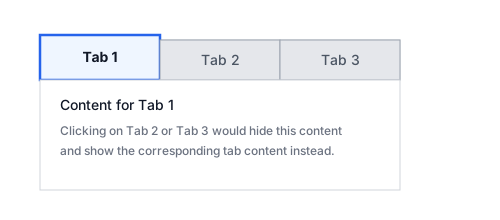
Requirements:
- The component should render a list of tab headers and matching content panels based on a given JavaScript array of tab objects.
- Only one tab's content should be visible at a time.
- Clicking on a tab header should:
- Mark that tab as the active tab (e.g. via an
activeclass). - Show the corresponding tab content panel and hide the others.
- Mark that tab as the active tab (e.g. via an
- The first tab should be active and visible by default when the page loads.
- The implementation should support multiple independent tab groups on the same page (each
.tabssection should work on its own). - The solution should not rely on global variables for specific tab IDs; it should work for any number of tabs inside a
.tabscontainer.
You should generate the tab headers and their content from a JavaScript array like this:
const tabs = [
  { id: 'tab-1', label: 'Tab 1', content: 'Content for Tab 1' },
  { id: 'tab-2', label: 'Tab 2', content: 'Content for Tab 2' },
  { id: 'tab-3', label: 'Tab 3', content: 'Content for Tab 3' },
];
Example
Given the following HTML structure:
<section class="tabs">
  <ul class="tab-headers">
    <li class="tab-header active">Tab 1</li>
    <li class="tab-header">Tab 2</li>
    <li class="tab-header">Tab 3</li>
  </ul>
  <div class="tab-contents">
    <div class="tab-content active">Content for Tab 1</div>
    <div class="tab-content">Content for Tab 2</div>
    <div class="tab-content">Content for Tab 3</div>
  </div>
</section>
Your JavaScript should wire up the behavior so that clicking each .tab-header shows the matching .tab-content and updates the active classes accordingly.