What is Hydration in React?
Hydration is what React does when it arrives in the browser and finds that the HTML is already there. Instead of building the page from scratch, it walks the existing DOM, matches it up with your components, and attaches event handlers. The server did the drawing; hydration makes the drawing clickable.
That's the one-sentence version. But I think hydration is one of those topics where the one-sentence version is exactly what gets you in trouble, because the interesting part is why it works the way it does, and what happens when it doesn't. So let's build it up from the problem.
Start with an empty page
Here's what a classic client-rendered React app sends to the browser:
<body>
  <div id="root"></div>
  <script src="/bundle.js"></script>
</body>
That's it. An empty div and a promise. The browser has nothing to show until it downloads bundle.js, parses it, runs it, and React renders your components into that div. On a fast laptop you barely notice. On a mid-range phone over a train's Wi-Fi, you stare at white for a few seconds.
There's a second, quieter problem: anything that reads the HTML without running JavaScript (some crawlers, link previews in chat apps) sees an empty page too.
The obvious fix is to run the components on the server and send real HTML. React has supported this since the beginning. And it works: the user sees content almost immediately.
But now we have a strange situation. The page looks finished, but it's just HTML. There's no React behind it. Click a button and nothing happens, because no one has attached an onClick to anything. The state your components keep in useState doesn't exist anywhere.
So once the JavaScript does arrive, React has to somehow take over this page. That "taking over" is hydration.
What hydration actually does
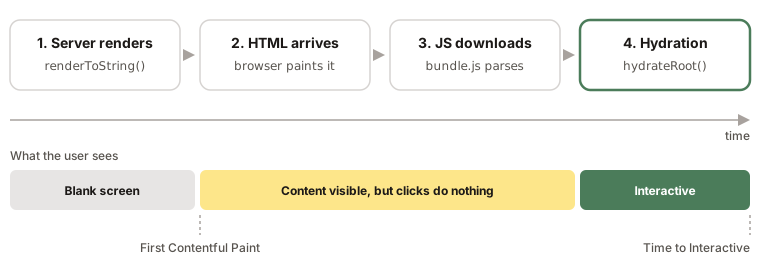
Let's walk through it in order.
On the server, React renders your component tree to HTML. Nowadays you'd use a streaming API for this:
// server.js
import { renderToPipeableStream } from 'react-dom/server';
import App from './App';

app.get('/', (req, res) => {
  const { pipe } = renderToPipeableStream(<App />, {
    bootstrapScripts: ['/bundle.js'],
    onShellReady() {
      res.setHeader('Content-Type', 'text/html');
      pipe(res);
    },
  });
});
(renderToString still exists and still works, but it can't stream and it doesn't really understand Suspense. I'll come back to why that matters.)
The browser receives that HTML and paints it. This is the moment your First Contentful Paint happens, and it happens before any of your JavaScript has run.
Meanwhile the browser is downloading the bundle. When it finishes, your client entry point runs:
// client.js
import { hydrateRoot } from 'react-dom/client';
import App from './App';

hydrateRoot(document.getElementById('root'), <App />);
Here's the part that I think is worth slowing down on. hydrateRoot does render your components. It calls every component function, runs every hook, and builds the whole tree in memory, just like a normal render. What it doesn't do is create DOM nodes. Instead, as it goes, it looks at the DOM node that's already sitting in that position and says "ok, this <button> is mine now." It attaches the event listeners and moves on.
When it reaches the end, React owns the page, and from then on it's indistinguishable from an app that was rendered on the client.
If you've only used Next.js or Remix, you've never written either of these snippets, because the framework calls them for you. That's fine. But the mechanics are the same underneath, and they're exactly what you need to understand when a hydration error shows up in your console at 11pm.
Hydrating isn't the same as rendering
It's tempting to think of hydration as "render, but faster." I find it more useful to think of it as "render, but with a strong assumption."
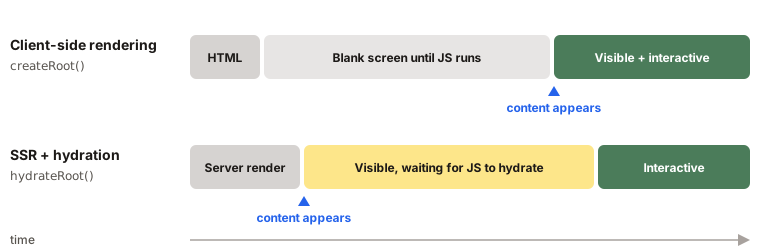
With createRoot, React builds the DOM itself, so it knows exactly what's in it. With hydrateRoot, React is adopting a DOM that someone else built (the server), and it trusts that this DOM looks exactly like what it would have built. It doesn't diff the two and patch up the differences the way an update would. It just checks as it goes, and if it finds something it didn't expect, it has a problem.
// Builds the DOM from nothing
createRoot(container).render(<App />);

// Adopts the DOM the server already produced
hydrateRoot(container, <App />);
That assumption is the whole story of hydration errors.
When the server and the browser disagree
The rule fits in one line:
The first render in the browser must produce the same output as the render on the server.
Most of the time that's free. Your components are pure functions of their props and state, the server and the client get the same props, so they produce the same HTML. But "most of the time" leaves a lot of room.
Here's a component that looks completely harmless:
function Clock() {
  return <p>Time: {new Date().toLocaleTimeString()}</p>;
}
The server runs it at 10:00:01. The HTML travels over the network, the bundle downloads, and the browser runs the same component at 10:00:02. Same code, different output.
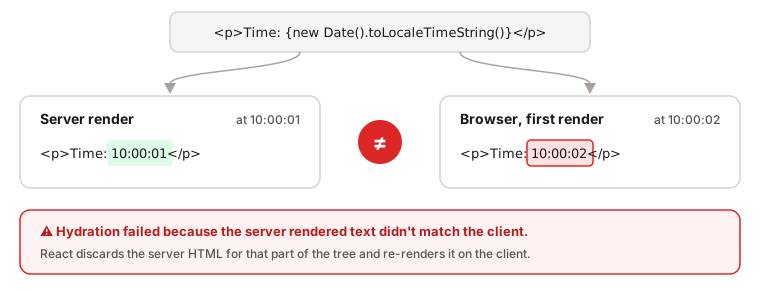
React notices that the text it's about to "adopt" isn't the text it rendered, and you get an error like "Hydration failed because the server rendered text didn't match the client."
What happens next is worth knowing. React doesn't try to surgically patch the one text node. It gives up on hydrating that part of the tree (everything up to the nearest <Suspense> boundary, or the whole root if there isn't one), throws the server HTML away, and renders it again from scratch on the client. So you've paid for server rendering and then thrown the result away. Users may see a flicker as the content is replaced.
Attributes are sneakier. If a className or href differs, React warns about it in development, but there's no guarantee it'll fix it up in production. You can end up with a DOM that doesn't match your component's output, which is the kind of bug that's very hard to track down later.
Where mismatches come from
Once you know the rule, the causes are mostly about things that are different on the server and in the browser:
- Time and randomness.
new Date(),Date.now(),Math.random(), anything that changes between two calls. - Browser-only APIs. Reading
window,localStorage,navigatorormatchMediawhile rendering. On the server they don't exist (or you guard them and render something different, which is the same problem). - Locale and time zone. Your server is in UTC with an
en-USlocale. Your user isn't.toLocaleString()will happily disagree. - The
typeof windowcheck.typeof window !== 'undefined' ? <A /> : <B />is a mismatch by definition: the server always rendersB, the browser always rendersA. - Invalid HTML. This one surprises people. If you put a
<div>inside a<p>, the browser's HTML parser "fixes" it before React ever sees it, so the DOM no longer has the shape your components describe. - Browser extensions. Some extensions inject elements or attributes into the page before React hydrates. You didn't do anything wrong, but React still sees a DOM it didn't expect.
How to fix them
The general idea is always the same: render the same thing on both sides first, and only then switch to the browser-specific version.
The most direct way to do that is an effect. Effects don't run on the server, and in the browser they run after hydration, so they're the natural place for anything that depends on the browser:
function Clock() {
  const [time, setTime] = useState(null);

  useEffect(() => {
    setTime(new Date().toLocaleTimeString());
  }, []);

  return <p>Time: {time ?? '--:--:--'}</p>;
}
Both the server and the first client render produce --:--:--. Hydration succeeds. Then the effect runs and the real time appears. It's an extra render, but it's an honest one.
If you need this in several places, it's worth pulling out into a small hook:
function useIsClient() {
  const [isClient, setIsClient] = useState(false);
  useEffect(() => setIsClient(true), []);
  return isClient;
}

function ThemeToggle() {
  const isClient = useIsClient();
  if (!isClient) return <button disabled>Theme</button>;
  return <button>{localStorage.getItem('theme')}</button>;
}
For generated IDs (the htmlFor/id dance for form labels), don't use a counter or a random number. useId exists precisely for this. It produces the same ID on the server and on the client:
function Field({ label }) {
  const id = useId();
  return (
    <>
      <label htmlFor={id}>{label}</label>
      <input id={id} />
    </>
  );
}
Sometimes a component simply has no meaningful server version, like a map widget that needs window everywhere. In Next.js you can opt it out of server rendering entirely:
'use client';
import dynamic from 'next/dynamic';

const Map = dynamic(() => import('./Map'), { ssr: false });
And then there's suppressHydrationWarning:
<time dateTime={iso} suppressHydrationWarning>
  {new Date(iso).toLocaleString()}
</time>
I'd treat this one as an escape hatch, not a fix. It only applies to that single element's own text and attributes (not its children), and it's meant for cases like this one, where a value is expected to differ and you're fine with it. If you find yourself sprinkling it around to make errors go away, the errors are probably telling you something.
Finally, if the mismatch comes from invalid HTML, the fix is to make the HTML valid. No React API will help with a <div> inside a <p>.
React 19 made this whole area a lot less painful, by the way. Hydration errors now show you a single diff of what didn't match instead of a wall of warnings, and React skips over unexpected tags that third-party scripts or extensions insert into <head> and <body> instead of failing on them.
Hydrating in pieces
So far I've described hydration as one pass over the whole page. That's how it worked before React 18, and it had an unpleasant property: it was all or nothing. React had to load the code for every component on the page and hydrate the entire tree before anything became interactive. One heavy comments widget at the bottom could hold the "Buy" button at the top hostage.
React 18 changed this by letting <Suspense> boundaries work during server rendering too:
<Layout>
  <Header />
  <Suspense fallback={<SidebarSkeleton />}>
    <Sidebar />
  </Suspense>
  <Suspense fallback={<PostSkeleton />}>
    <Post />
  </Suspense>
  <Suspense fallback={<CommentsSkeleton />}>
    <Comments />
  </Suspense>
</Layout>
Each boundary is now a unit that can be streamed and hydrated on its own. This is called selective hydration, and the part I find genuinely clever is how it decides what to do first.
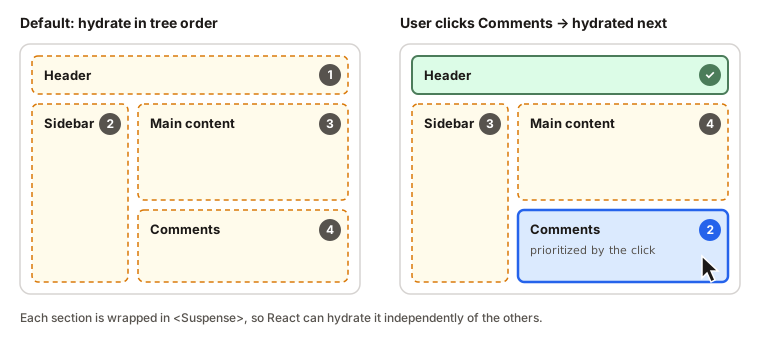
By default, React hydrates the boundaries more or less in the order they appear in the tree. But if the user clicks inside a section that hasn't been hydrated yet, React notices, bumps that section to the front of the line, hydrates it, and then replays the click. From the user's point of view, the thing they clicked just worked. They have no idea the sidebar is still waiting its turn.
This is also why renderToString is a dead end for modern apps: it can't stream, so it can't do any of this.
How this fits with SSR, SSG and friends
You'll often hear hydration mentioned alongside a pile of acronyms. The way I think about it: they differ in when the HTML gets generated, and hydration is what happens after, in every case except pure client rendering.
| Strategy | When the HTML is generated | Hydration? | Good fit |
|---|---|---|---|
| CSR (client-side rendering) | In the browser | No, it uses createRoot |
Dashboards, apps behind a login |
| SSR (server-side rendering) | On every request | Yes | Personalized or frequently changing pages |
| SSG (static site generation) | At build time | Yes | Docs, blogs, marketing pages |
| ISR (incremental static regeneration) | At build time, refreshed in the background | Yes | Large sites whose content changes now and then |
Hydration isn't free
It's easy to come away thinking server rendering plus hydration is strictly better than client rendering. It's usually better, but it has real costs, and they're worth being honest about.
The first one is the gap in the timeline diagram: the stretch where the page looks ready but isn't. Users don't know about hydration. They see a button, they tap it, nothing happens, they tap again. That gap shows up directly in INP (Interaction to Next Paint), and on slow devices it can be long.
The second is that you do the work twice. Every component runs on the server to make the HTML, and then runs again in the browser during hydration, including components that will never change, like a static footer. And the browser has to download the JavaScript for all of them just so React can confirm that the HTML it already has is correct.
A lot of recent work in the ecosystem is, at heart, about shrinking that second cost:
- React Server Components render only on the server and send no JavaScript at all, so there's nothing to hydrate. Only components marked
'use client'are hydrated. That static footer can finally stay static. - Islands architecture (Astro is the best-known example) treats the page as static HTML with a few interactive "islands," and only hydrates those.
- Resumability (Qwik's approach) tries to skip the re-render entirely by serializing enough state on the server that the browser can just pick up where the server left off.
- And the boring classic: code splitting. Less JavaScript means less to hydrate.
If someone asks you in an interview
Here's roughly how I'd answer "What is hydration in React?":
Hydration is how a server-rendered React page becomes interactive. The server sends real HTML so the user sees content right away. When the JavaScript loads,
hydrateRootrenders the same components in the browser, but instead of creating DOM nodes it adopts the ones the server already made and attaches event handlers. The catch is that the first client render must match the server HTML exactly. Otherwise you get a hydration mismatch and React re-renders that part on the client.
A few follow-ups that tend to come next:
What's the difference between render and hydrate? createRoot(...).render() builds the DOM from nothing. hydrateRoot() assumes the DOM already exists and attaches React to it.
Does useEffect run on the server? No. Effects only run in the browser, after hydration, which is exactly why they're the right place for browser-only code.
Why not just check typeof window during render? Because then the server and the browser render different trees, and that's the definition of a hydration mismatch.
Is a server-rendered, hydrated page good for SEO? Yes. Crawlers get the full HTML from the server. Hydration only affects interactivity, not the content that's already there.
Are Server Components hydrated? No. They run only on the server and their code never reaches the browser. Client Components are still pre-rendered on the server and then hydrated.