TypeScript satisfies Operator Explained
The TypeScript satisfies operator checks that a value matches a type without changing the type of that value. You get an error if the value doesn't fit, and you keep the precise type TypeScript worked out on its own.
It was added in TypeScript 4.9. The short version: use satisfies when you want TypeScript to check an object, but you still want to know exactly what is inside it.
The problem it solves
Say we have a color palette. Each color is either a string like "#00ff00" or an array of three numbers (red, green, blue):
type Colors = Record<"red" | "green" | "blue", string | number[]>;
Before satisfies, we had two ways to give the object this type, and both had a downside.
Option 1: a type annotation.
const palette: Colors = {
  red: [255, 0, 0],
  green: "#00ff00",
  blue: [0, 0, 255],
};

palette.green.toUpperCase(); // Error!
The annotation checks the object, which is good. But then TypeScript forgets what it saw. It now thinks every color is string | number[], so it doesn't know that green is a string. Calling a string method gives an error.
Option 2: as.
const palette = {
  red: [255, 0, 0],
  green: "#00ff00",
} as Colors; // forgot "blue", and no error!
An assertion (as) means "trust me". TypeScript stops checking, so a missing property slips through.
We wanted both things at once: check my object and remember what it looks like. That's exactly what satisfies does.
How satisfies works
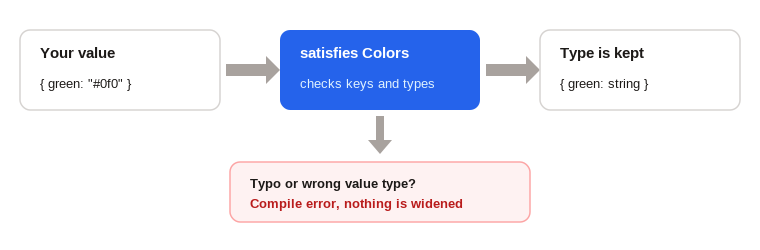
You put satisfies Type after the value:
const palette = {
  red: [255, 0, 0],
  green: "#00ff00",
  blue: [0, 0, 255],
} satisfies Colors;

palette.green.toUpperCase(); // OK: green is a string
palette.red.at(0);           // OK: red is a number array
It works in two steps:
- Check. TypeScript compares the value with
Colors. If a key is missing, misspelled, or has the wrong type of value, you get an error right here. - Keep. If the check passes, the variable gets the type TypeScript inferred from the value itself, not the type you checked against.
Here's what the error looks like when we make a typo:
const palette = {
  red: [255, 0, 0],
  green: "#00ff00",
  bleu: [0, 0, 255], // typo
} satisfies Colors;
// Error: the object doesn't match Colors (blue is missing, bleu is not allowed)
satisfies vs type annotation vs as
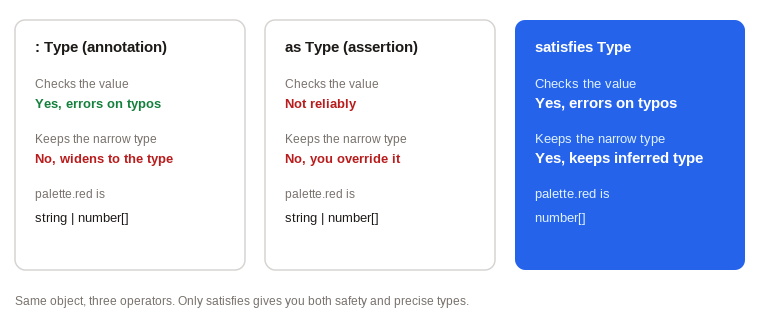
: Type | as Type | satisfies Type | |
|---|---|---|---|
| Checks the value | Yes | Not reliably | Yes |
| Keeps the narrow inferred type | No, uses Type | No, uses Type | Yes |
| Catches missing properties | Yes | No | Yes |
| Runs at runtime | No | No | No |
A simple way to remember it:
- Annotation: "this variable is a
Type." Use it when you want the wide type everywhere, like for function parameters or aletvariable that will change. as: "I know better than the compiler." Use it rarely, for example when you are sure about a value TypeScript can't see into.satisfies: "this value fitsType, but remember its real shape."
Autocomplete and typo checks for keys
satisfies also helps with the keys of an object. With an index-signature type, an annotation lets you read any key without complaint:
type Handlers = Record<string, (value: string) => void>;

const a: Handlers = { log: (v) => console.log(v) };
a.lgo("hi"); // no error: any string key is allowed by the type

const b = { log: (v) => console.log(v) } satisfies Handlers;
b.lgo("hi"); // Error: 'lgo' does not exist
b.log("hi"); // OK
Two nice things happen in b. The parameter v is still typed as string, because TypeScript uses Handlers to understand the function. And since b keeps its own shape, it only has the key log, so the typo is caught.
The as const satisfies pattern
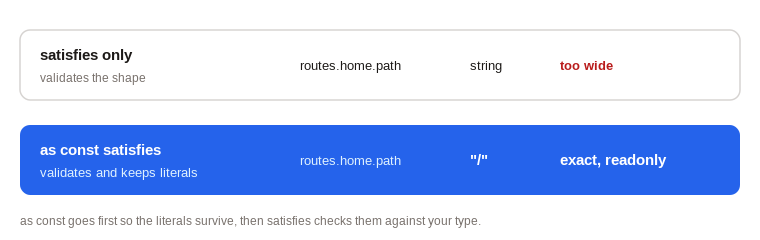
Sometimes you want even more precision. Take a route map:
const routes = {
  home: { path: "/" },
  profile: { path: "/profile/:id" },
} satisfies Record<string, { path: string }>;
The shape is checked, but routes.home.path is just string, because TypeScript widens text values in a regular object. If you want the exact value "/" as a type, add as const first:
const routes = {
  home: { path: "/" },
  profile: { path: "/profile/:id" },
} as const satisfies Record<string, { path: string }>;

type RouteName = keyof typeof routes; // "home" | "profile"
type HomePath = typeof routes.home.path; // "/"
as const freezes the object into deeply readonly data with exact literal types. Then satisfies checks that frozen object against your type. You get a checked config and types you can derive from it.
One gotcha: as const makes arrays readonly, and a readonly array can't be assigned to a normal mutable array type. If your type uses arrays, write readonly string[], not string[]:
const tags = ["a", "b"] as const satisfies readonly string[]; // OK
// ["a", "b"] as const satisfies string[]  -> Error: readonly can't go into mutable
Examples
1. Autocomplete on a theme object
const theme = {
  colors: { primary: "#2563eb", danger: "#dc2626" },
  spacing: { sm: 4, md: 8 },
} satisfies Record<string, Record<string, string | number>>;
Problem: with an annotation, theme.colors.primary would be string | number, and editor suggestions would be useless.
Why: annotations replace the inferred type with the wide one.
Fix: satisfies validates the shape and keeps colors and spacing with their real keys, so theme.colors. suggests primary and danger.
2. A missing key in a lookup table
type Status = "idle" | "loading" | "error";

const labels = {
  idle: "Ready",
  loading: "Loading...",
} satisfies Record<Status, string>; // Error: 'error' is missing
Problem: you add a new status to the union and forget to add a label.
Why: Record<Status, string> requires every status as a key.
Fix: the error points at the missing key. With as Record<Status, string>, the same bug would compile and show undefined to users.
3. A union value you still want to narrow
const config = {
  port: 3000,
  host: "localhost",
} satisfies Record<string, string | number>;

config.port.toFixed(0);     // OK: port is a number
config.host.toUpperCase();  // OK: host is a string
Problem: with an annotation, both values are string | number, so neither method call compiles.
Fix: satisfies keeps each property's own type.
When not to use satisfies
- When you want a wide type on purpose. If a variable will be reassigned to other valid values, annotate it:
let status: Status = "idle". - For function parameters and return types. These are contracts, so use annotations.
- When the value is not an object literal you wrote.
satisfiesshines on literals. For a value coming fromfetchorJSON.parse, the type isn't known at compile time, so no operator can make it safe. Validate it at runtime.
Interview answer
The
satisfiesoperator, added in TypeScript 4.9, checks that a value matches a type without widening the value's inferred type. A type annotation checks but replaces the type with the wide one, andasskips the check. So withsatisfiesI get errors for typos and missing keys, plus precise types and autocomplete afterwards. It's most useful for config objects, andas const satisfiesalso keeps exact literal values.
Summary
satisfies Typechecks a value against a type and keeps the inferred type.- It was introduced in TypeScript 4.9.
- A type annotation checks the value but widens it to the annotated type.
asis an assertion. It doesn't reliably catch missing or wrong properties.satisfiescatches typos in keys and missing keys, like a missingRecordentry.- It gives function parameters inside the object their types from the checked type.
as const satisfieskeeps exact literals and makes the valuereadonly.- With
as const, check againstreadonlyarray types. satisfiesis erased at compile time and costs nothing at runtime.- Best for config objects, theme tokens, route maps and lookup tables. Use plain annotations for parameters, return types and variables that change.