useEffect Cleanup Function Explained
The useEffect cleanup function is the function you return from inside useEffect. React calls it to undo whatever your effect set up: remove an event listener, clear a timer, close a connection, or ignore a request that's no longer needed.
useEffect(() => {
  // setup: start something
  return () => {
    // cleanup: stop it
  };
}, [dependencies]);
That's all the syntax there is. The tricky parts are when React calls it and what you need to clean up, so let's go through those.
Why cleanup exists
An effect is how a component connects to something outside of React: the browser window, a timer, a WebSocket, a server. React manages your component, but it doesn't know anything about those outside things. If your effect starts something, React has no way to stop it, unless you tell it how.
Here's an effect without a cleanup:
function WindowWidth() {
  const [width, setWidth] = useState(window.innerWidth);

  useEffect(() => {
    window.addEventListener('resize', () => setWidth(window.innerWidth));
  }, []);

  return <p>Width: {width}px</p>;
}
It looks fine. But every time this component appears on the screen, it adds a new listener to window, and nothing ever removes it. Open and close a panel containing this component five times, and five listeners are still running, trying to update components that no longer exist. That's a memory leak.
A good way to think about it: every setup needs a matching undo. If the effect turns something on, the cleanup turns it off.
useEffect(() => {
  const handleResize = () => setWidth(window.innerWidth);
  window.addEventListener('resize', handleResize);

  return () => {
    window.removeEventListener('resize', handleResize);
  };
}, []);
Now, when the component disappears, React calls the cleanup and the listener is removed.
When does cleanup run?
This is the part most people get wrong. The cleanup doesn't only run when the component disappears. It runs every time the effect is about to run again.
Let's use a chat room as an example. The component connects to a room based on a roomId prop:
function ChatRoom({ roomId }) {
  useEffect(() => {
    const connection = createConnection(roomId);
    connection.connect();

    return () => {
      connection.disconnect();
    };
  }, [roomId]);

  return <h1>Welcome to room {roomId}</h1>;
}
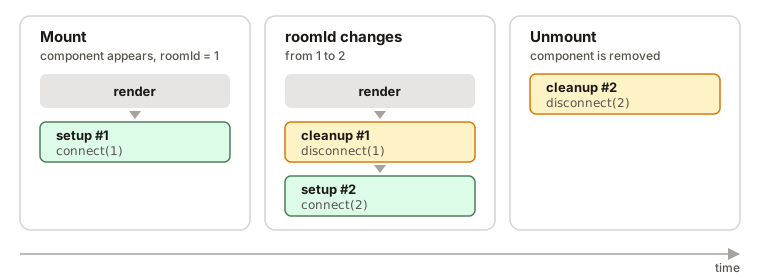
Step by step:
- The component mounts with
roomId = 1. React renders it, then runs the effect: it connects to room 1. roomIdchanges to 2. React renders again. Before running the effect for room 2, it runs the previous cleanup, which disconnects from room 1. Then it runs the new setup and connects to room 2.- The component unmounts. React runs the last cleanup and disconnects from room 2.
Notice something in step 2: the cleanup disconnects from room 1, not room 2. Each cleanup remembers the values from the render it was created in. That's exactly what you want, because it undoes its own setup.
How the dependency array affects cleanup
| Dependency array | Setup runs | Cleanup runs |
|---|---|---|
None: useEffect(fn) | After every render | Before every re-run, and on unmount |
Empty: useEffect(fn, []) | Once, after mount | Once, on unmount |
With values: useEffect(fn, [roomId]) | After mount, and whenever roomId changes | Before each re-run, and on unmount |
Why your effect runs twice in development
If you're using <StrictMode> (Next.js and Vite templates turn it on by default), you'll notice your effects run twice when the component first appears. That's on purpose.
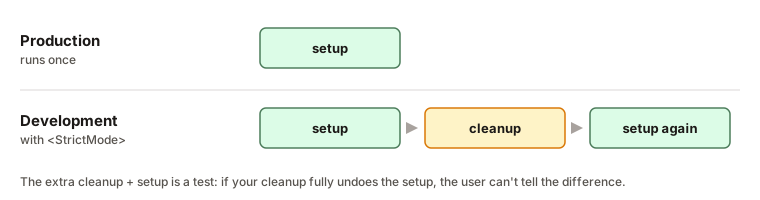
In development, React mounts your component, immediately unmounts it, and mounts it again. So the effect runs setup → cleanup → setup. It's a stress test: if your cleanup properly undoes the setup, running it an extra time changes nothing. If you see a bug, like two connections or a doubled listener, it means your cleanup is missing or incomplete.
This only happens in development. In production, setup runs once.
What to clean up
Almost every cleanup is simply the opposite of the setup:
| Setup | Cleanup |
|---|---|
addEventListener(...) | removeEventListener(...) with the same function |
setInterval(...) | clearInterval(id) |
setTimeout(...) | clearTimeout(id) |
store.subscribe(...) | call the returned unsubscribe() |
new WebSocket(...) | socket.close() |
observer.observe(el) | observer.disconnect() |
fetch(url) | controller.abort(), or ignore the result |
If your effect only reads something and doesn't start anything, like setting document.title, you usually don't need a cleanup.
Fetching data: avoiding race conditions
Data fetching is where a missing cleanup causes the most confusing bugs. Here's a typical effect:
useEffect(() => {
  fetch(`/api/users/${userId}`)
    .then((res) => res.json())
    .then((data) => setUser(data));
}, [userId]);
Now imagine the user clicks "User 1", then quickly clicks "User 2". Two requests are in flight. Network requests don't always finish in the order they were sent, so if the request for user 1 is slower, here's what happens:
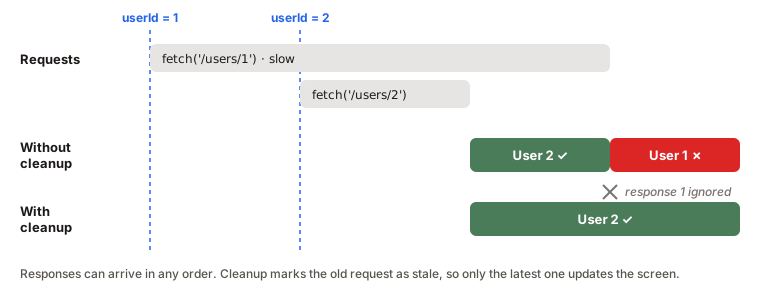
The screen shows user 2 for a moment, then the late response for user 1 arrives and overwrites it. The page says "User 2" in the URL but shows user 1's data. This is called a race condition.
The fix is a cleanup that marks the old request as stale:
useEffect(() => {
  let ignore = false;

  fetch(`/api/users/${userId}`)
    .then((res) => res.json())
    .then((data) => {
      if (!ignore) setUser(data);
    });

  return () => {
    ignore = true;
  };
}, [userId]);
When userId changes, React runs the cleanup for the old effect, which sets its ignore to true. When the old response finally arrives, it's ignored. Only the latest request can update the screen.
You can also cancel the request itself with an AbortController, which saves bandwidth too:
useEffect(() => {
  const controller = new AbortController();

  fetch(`/api/users/${userId}`, { signal: controller.signal })
    .then((res) => res.json())
    .then(setUser)
    .catch((err) => {
      if (err.name !== 'AbortError') throw err;
    });

  return () => controller.abort();
}, [userId]);
What about useLayoutEffect?
useLayoutEffect works exactly the same way, including the cleanup. The only difference is timing: it runs before the browser paints. See useEffect vs useLayoutEffect for when that matters.
Examples
1. A listener that never gets removed
useEffect(() => {
  window.addEventListener('scroll', () => setY(window.scrollY));
  return () => {
    window.removeEventListener('scroll', () => setY(window.scrollY));
  };
}, []);
Problem: the scroll listener keeps running after the component unmounts.
Why: the two arrow functions look the same but are different functions. removeEventListener only removes the exact function that was added.
Fix: store the function in a variable and pass the same one to both calls.
useEffect(() => {
  const onScroll = () => setY(window.scrollY);
  window.addEventListener('scroll', onScroll);
  return () => window.removeEventListener('scroll', onScroll);
}, []);
2. An async effect
useEffect(async () => {
  const data = await fetchUser(userId);
  setUser(data);
}, [userId]);
Problem: React shows a warning, and you can't add a cleanup.
Why: an async function always returns a Promise. React expects the effect to return a cleanup function or nothing.
Fix: define the async function inside the effect and call it.
useEffect(() => {
  let ignore = false;

  async function load() {
    const data = await fetchUser(userId);
    if (!ignore) setUser(data);
  }
  load();

  return () => {
    ignore = true;
  };
}, [userId]);
3. A timer that keeps ticking
useEffect(() => {
  setInterval(() => setSeconds((s) => s + 1), 1000);
}, []);
Problem: in development the counter goes up by 2 every second, and in production the timer keeps running after the component unmounts.
Why: there's no cleanup, so the interval is never cleared. StrictMode's extra setup starts a second interval, which is how this bug becomes visible.
Fix: save the interval ID and clear it.
useEffect(() => {
  const id = setInterval(() => setSeconds((s) => s + 1), 1000);
  return () => clearInterval(id);
}, []);
4. A debounced search (cleanup used on purpose)
useEffect(() => {
  const id = setTimeout(() => search(query), 300);
  return () => clearTimeout(id);
}, [query]);
How it works: every keystroke changes query, which runs the cleanup and cancels the previous timer before starting a new one. The search only runs once the user stops typing for 300ms. Here the cleanup isn't preventing a bug, it is the feature.
Interview answer
The cleanup function is what you return from useEffect. React calls it to undo the effect: remove listeners, clear timers, close connections, or ignore outdated requests. It runs before the effect runs again because a dependency changed, and when the component unmounts. Each cleanup sees the values from its own render, so it undoes exactly its own setup. In development, StrictMode runs an extra setup and cleanup cycle to check that the cleanup is correct.
Summary
- The cleanup is the function you return from
useEffect. - It undoes the setup: every "start" needs a matching "stop".
- It runs before the effect re-runs and on unmount, not only on unmount.
- Each cleanup sees the old values from its own render.
- With
[], cleanup runs once, on unmount. With no array, it runs before every re-run. - In development, StrictMode runs setup → cleanup → setup to test your cleanup. Production runs setup once.
- Missing cleanups cause memory leaks, duplicated listeners and timers, and race conditions in data fetching.
- For fetching, use an
ignoreflag or anAbortControllerin the cleanup. - Don't pass an
asyncfunction touseEffect. Call one from inside it. useLayoutEffectcleans up the same way. It just runs before paint.