useEffect vs useLayoutEffect
useEffect and useLayoutEffect do the same job and take the same arguments. The only difference is when they run. useEffect runs after the browser has painted the screen. useLayoutEffect runs just before the browser paints, and the browser waits for it to finish.
useEffect(() => {
  // runs after the user sees the update
}, [deps]);

useLayoutEffect(() => {
  // runs before the user sees the update
}, [deps]);
The short rule: use useEffect by default, and switch to useLayoutEffect only if you see a flicker. The rest of this page explains why.
What happens when React updates the screen
To see the difference, it helps to know the steps React and the browser go through after state changes:
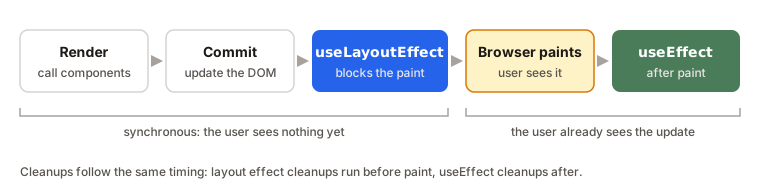
- Render. React calls your components to find out what the UI should look like.
- Commit. React updates the real DOM to match. The DOM is now up to date, but nothing has appeared on the screen yet.
useLayoutEffectruns. The browser is waiting. Anything you do here, including updating state, happens before the user sees a single pixel.- The browser paints. The user now sees the update.
useEffectruns, usually a moment after the paint.
So the two hooks sit on opposite sides of one important moment: the paint.
Why useEffect is the default
Most effects don't care about that moment. Fetching data, subscribing to a store, logging analytics, setting up a timer: none of these change what the user sees right now.
For those, running after the paint is better, because the user sees the update as quickly as possible and the effect happens in the background. If you put them in useLayoutEffect instead, the browser has to wait for them before it can show anything. Slow code there makes the whole page feel slow.
When useLayoutEffect matters: preventing flicker
There's one situation where running after the paint causes a visible problem: when you need to measure the DOM and then change the layout based on that measurement.
The classic example is a tooltip. It should appear above a button, unless there's no room at the top of the screen, in which case it should go below. But you can't know the tooltip's height until it's in the DOM.
With useEffect, here's what the user sees:
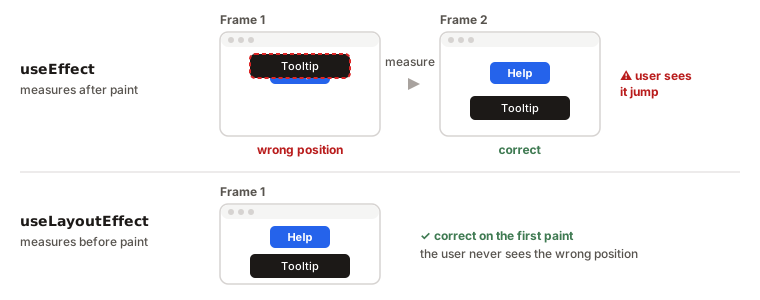
- Frame 1: the browser paints the tooltip at its default position, which is wrong.
- Then
useEffectmeasures it, updates state, and React re-renders. - Frame 2: the tooltip jumps to the correct position.
That jump is the flicker. With useLayoutEffect, the measuring and the re-render happen before the first paint, so the user only ever sees the correct position.
function Tooltip({ targetRect, children }) {
  const ref = useRef(null);
  const [height, setHeight] = useState(0);

  useLayoutEffect(() => {
    setHeight(ref.current.getBoundingClientRect().height);
  }, []);

  const fitsAbove = targetRect.top - height >= 0;
  const top = fitsAbove ? targetRect.top - height : targetRect.bottom;

  return (
    <div ref={ref} style={{ position: 'absolute', top }}>
      {children}
    </div>
  );
}
Updating state inside useLayoutEffect is fine here. React handles that update immediately, before the browser paints.
Cleanup works the same way
Both hooks can return a cleanup function, and it runs at the same point as the hook itself: before the next run and when the component unmounts. A useLayoutEffect cleanup runs before paint, a useEffect cleanup after. If you're not sure how cleanup works, see the useEffect cleanup function.
What about useInsertionEffect?
There's a third, rarely needed hook: useInsertionEffect. It runs even earlier, before useLayoutEffect, and exists for CSS-in-JS libraries that need to inject <style> tags before anything reads the layout. You'll almost certainly never write one yourself. It's worth knowing about only so the name doesn't surprise you.
Examples
1. A tooltip that jumps
useEffect(() => {
  setHeight(ref.current.getBoundingClientRect().height);
}, []);
Problem: the tooltip appears in the wrong place for a moment, then jumps.
Why: useEffect runs after the paint, so the user sees the first, unmeasured position.
Fix: switch to useLayoutEffect. The code stays the same.
2. Scrolling a chat to the latest message
useLayoutEffect(() => {
  listRef.current.scrollTop = listRef.current.scrollHeight;
}, [messages]);
Why useLayoutEffect: with useEffect, the new message would briefly appear at the old scroll position, then the list would jump down. Setting the scroll position before the paint makes it look instant.
3. Fetching data in the wrong hook
useLayoutEffect(() => {
  fetch('/api/user').then((res) => res.json()).then(setUser);
}, []);
Problem: nothing is broken, but this is the wrong tool.
Why: the request is asynchronous, so the data arrives after the paint anyway. You gain nothing, and any work done synchronously inside the hook delays the paint.
Fix: use useEffect. Data fetching never needs to block the screen.
Interview answer
Both hooks have the same API and both support cleanup. The difference is timing. useEffect runs after the browser paints, so it never delays what the user sees, which makes it the right default. useLayoutEffect runs after React updates the DOM but before the paint, and the browser waits for it. Use it only when you need to measure the DOM and adjust the layout before the user sees it, like positioning a tooltip, to avoid a visible flicker.
Summary
- Same API, same cleanup. Only the timing is different.
useEffectruns after the browser paints. It's the default for almost everything.useLayoutEffectruns before the paint, and the browser waits for it.- Use
useLayoutEffectwhen you measure the DOM and change the layout, for example tooltips, popovers and scroll position. - With
useEffect, measuring and then moving something causes a visible flicker. - Keep
useLayoutEffectshort: slow code there delays the whole screen. - Neither hook runs on the server.
useInsertionEffectruns even earlier and is meant for CSS-in-JS libraries only.