Why Does My React Component Re-render?
A React component re-renders when its own state changes, when its parent re-renders, or when a context it reads changes. Those are the only triggers. A changing prop is not a trigger on its own, because props only change when a parent re-rendered first.
This is one of the most common React interview questions, and the answer people usually give ("when props or state change") is only half right. Let's fix that.
First, what does "re-render" mean?
A render is React calling your component function to find out what the UI should look like. A re-render is just that happening again.
Here's the part that surprises people: a re-render does not mean the browser's DOM was updated. After React calls your function, it compares the new result with the previous one and only changes the DOM where something is different.
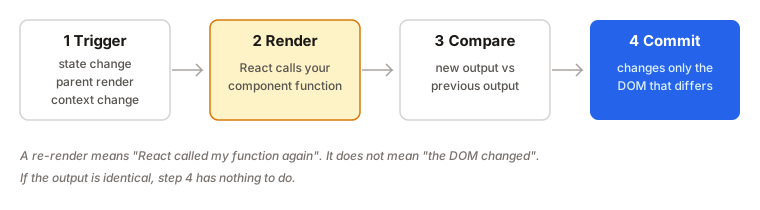
- Trigger. Something tells React the component might be out of date.
- Render. React calls your component function.
- Compare. React compares the new output with the old output.
- Commit. React changes only the parts of the DOM that differ.
So a re-render is often cheap, and often invisible. It's just your function running again.
The three triggers
1. Its own state changed
When you call a state setter like setCount(1), React schedules a re-render of that component.
function Counter() {
  const [count, setCount] = useState(0);
  return <button onClick={() => setCount(count + 1)}>{count}</button>;
}
If you set the state to the same value it already has, React compares the two values with Object.is. If they're equal, it skips the re-render, but it may still call your component once more before bailing out. So don't rely on the function never running.
One more detail: state objects must be replaced, not mutated. setUser(user) after changing user.name in place sends the same object, so React sees no change.
2. Its parent re-rendered
This is the trigger people forget. By default, when a component re-renders, React re-renders everything inside it, whether or not the props changed.
function App() {
  const [count, setCount] = useState(0);

  return (
    <>
      <button onClick={() => setCount(count + 1)}>Clicked {count}</button>
      <Header />
      <Sidebar />
    </>
  );
}
Header and Sidebar receive no props at all, and still re-render every time the button is clicked.
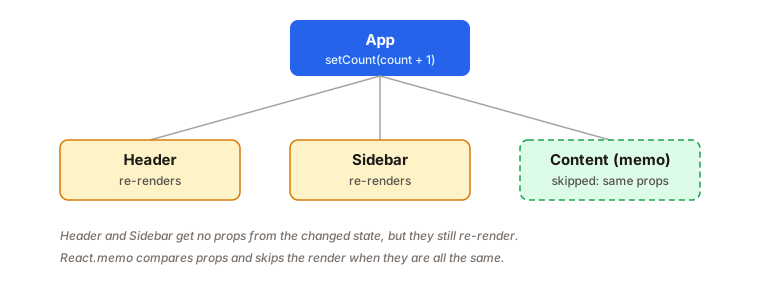
That's why "props changed" is a misleading answer. The real chain is: state changed in a parent, the parent re-rendered, so the children re-rendered, and any new props came along for the ride.
3. A context it reads changed
When a component calls useContext(SomeContext), it subscribes to that context. When the context's value changes, every component that reads it re-renders.
function Price() {
  const { currency } = useContext(SettingsContext);
  return <span>{currency}</span>;
}
React compares the old and new context value with Object.is. A common mistake is a provider like this:
<SettingsContext.Provider value={{ currency, locale }}>
The {{ ... }} creates a new object on every render, so the value is never equal to the last one, and every consumer re-renders whenever the provider's parent does. Create the object with useMemo, or split rarely-changing values into their own context.
How to stop an unnecessary re-render
Again: first check that it's a real problem. Most re-renders cost almost nothing. When one is genuinely slow (a huge list, a heavy chart), you have three tools.
Option 1: React.memo
memo wraps a component so React skips re-rendering it when its props are the same as last time.
const Content = memo(function Content({ items }) {
  // only re-renders when items changes
  return <List items={items} />;
});
React compares each prop with Object.is. That means numbers and strings compare by value, but objects, arrays and functions compare by reference. A new {} or () => {} created during the parent's render is never equal to the previous one.
// memo is defeated: a new object on every render
<Content options={{ sort: 'asc' }} />
To keep the reference stable, wrap the value in useMemo (for objects and arrays) or useCallback (for functions), or move it outside the component if it never changes.
memo only skips re-renders caused by the parent. If the component's own state or a context it reads changes, it re-renders anyway. And React treats memo as a performance hint, not a promise.
Option 2: Pass the expensive part as children
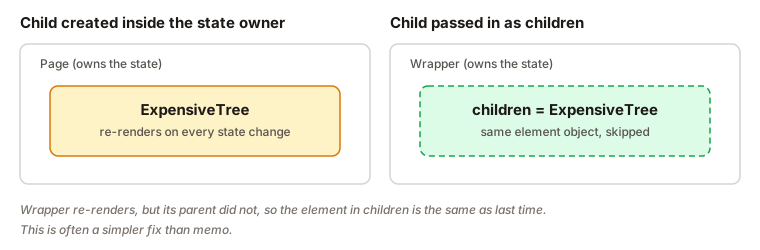
Sometimes you don't need memo at all. If a component owns some state, and only part of its output uses it, move that part into its own component, or accept the slow part as children.
function Wrapper({ children }) {
  const [open, setOpen] = useState(false);
  return (
    <div>
      <button onClick={() => setOpen(!open)}>Toggle</button>
      {open && <p>Details</p>}
      {children}
    </div>
  );
}

function Page() {
  return (
    <Wrapper>
      <ExpensiveTree />
    </Wrapper>
  );
}
When Wrapper re-renders because of its own open state, Page did not re-render, so the <ExpensiveTree /> element inside children is the same one as before. React sees that and reuses it.
Option 3: Move state down
If only one small piece of the screen needs a piece of state, put that state in a small component of its own. Then only that small component re-renders when it changes.
Examples
1. "I passed the same props, why did it re-render?"
function Parent() {
  const [n, setN] = useState(0);
  return (
    <>
      <button onClick={() => setN(n + 1)}>{n}</button>
      <Child name="Ada" />
    </>
  );
}
Problem: Child re-renders on every click even though name never changes.
Why: Parent re-rendered because its state changed, and React re-renders children by default.
Fix: wrap Child in memo if it's expensive.
const Child = memo(function Child({ name }) {
  return <p>{name}</p>;
});
2. memo that does nothing
const Chart = memo(ChartBase);

<Chart data={data} onSelect={(id) => select(id)} />
Problem: Chart re-renders every time, even with memo.
Why: onSelect is a brand new function each render, so the props are never equal.
Fix: keep the function reference stable.
const handleSelect = useCallback((id) => select(id), [select]);

<Chart data={data} onSelect={handleSelect} />
3. A mutated state object
function rename() {
  user.name = 'Grace';
  setUser(user);
}
Problem: the screen doesn't update.
Why: you passed the same object, so Object.is says nothing changed.
Fix: create a new object.
setUser({ ...user, name: 'Grace' });
4. An effect that re-renders forever
useEffect(() => {
  setItems([...items, 'new']);
}, [items]);
Problem: the component re-renders in an endless loop.
Why: the effect sets state, the new array is a new reference, the dependency changes, and the effect runs again.
Fix: don't derive state from itself in an effect. Update it in the event handler instead, or use the functional form with a correct dependency list. See useEffect cleanup for more on effect timing.
Interview answer
A React component re-renders when its own state changes, when its parent re-renders, or when a context it reads changes. By default, a parent re-render re-renders all its children, even if their props are the same, so a prop change isn't really a separate trigger. A re-render only means React called the component again. It compares the output and updates just the DOM that differs. To avoid expensive re-renders I would first measure, then move state down, pass heavy parts as children, or use React.memo with stable props.
Summary
- A render is React calling your component function. It is not the same as a DOM update.
- Three triggers: own state, parent re-render, context change.
- Props are not a trigger by themselves. They change because a parent re-rendered.
- By default, children re-render with their parent, even with identical props.
- Setting state to the same value (by
Object.is) is skipped, but never mutate state in place. - Context consumers re-render when the provider's
valuechanges. A new object each render means every time. React.memoskips parent-caused re-renders when props are equal. It does not stop state or context re-renders.- Objects, arrays and functions are compared by reference, so stabilize them with
useMemooruseCallback. - Often a cheaper fix is moving state down or passing children.
- Measure with the Profiler before optimizing.