React Key Prop and Reconciliation Explained
The React key prop is a unique label you give to each item in a list so React can tell items apart between renders. React uses it during reconciliation, the process of comparing the old UI with the new UI, to decide which components to keep, move, create or remove.
<ul>
  {todos.map((todo) => (
    <li key={todo.id}>{todo.text}</li>
  ))}
</ul>
Most people learn key as "the thing that makes the warning go away". It's much more useful than that. A wrong key can make inputs show the wrong text, and a right key can reset a whole form. Let's see how it works.
What is reconciliation?
Every time your state changes, React calls your component again and gets a new tree of elements. Then it has to answer one question: what is different from last time? Comparing two whole trees in a perfectly exact way would be slow, so React uses a simple set of rules (a heuristic) to do it fast.
The rules, in plain English:
- Same type at the same position: React keeps the existing component (or DOM node) and just updates its props.
- Different type at the same position: React throws the old one away, including everything inside it, and builds a new one from scratch.
- Lists: React needs help. It looks at the
keyof each child to match old children with new children.
Rules 1 and 2 are about position. Rule 3 is where key comes in.
State belongs to a position, not to your code
Here is the idea that makes keys click: React keeps a component's state attached to its position in the tree. As long as the same kind of component is rendered in the same spot, React keeps its state.
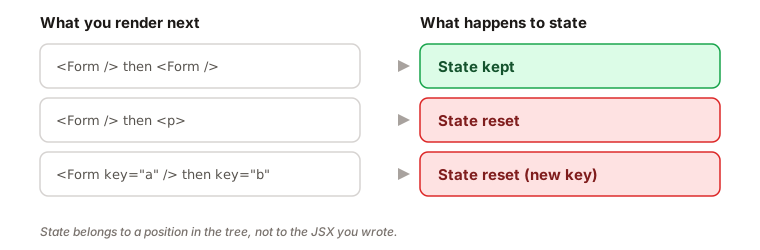
- Render
<Form />and then<Form />again in the same spot: state is kept. - Render
<Form />and then a<p>in the same spot: the type changed, so state is reset. - Render
<Form key="a" />and then<Form key="b" />: same type, but a different key means a different component, so state is reset.
That last one is a handy trick, and we'll use it below.
Why lists need keys
Now think about a list. React sees an array of three <li> elements. They are all the same type, so by position alone, React can't tell which is which. If you remove the first item, how does React know it was the first one that disappeared, and not the last?
It doesn't, unless you tell it. The key is the item's identity card. With keys, React can say: "Item 2 is still here, item 3 is still here, item 1 is gone." Without a good key, it falls back to position.
If you forget the key, React shows a warning in the console and falls back to using the index. The warning is there because that fallback is often wrong, as we'll see next.
Why the array index is a bad key
Using the index looks reasonable:
{fruits.map((fruit, index) => (
  <li key={index}>
    {fruit.name} <input />
  </li>
))}
Imagine three fruits, Apple, Banana and Cherry, and you type "a", "b" and "c" into their inputs. The inputs hold their text as state inside the DOM, tied to each component. Now you delete Apple.
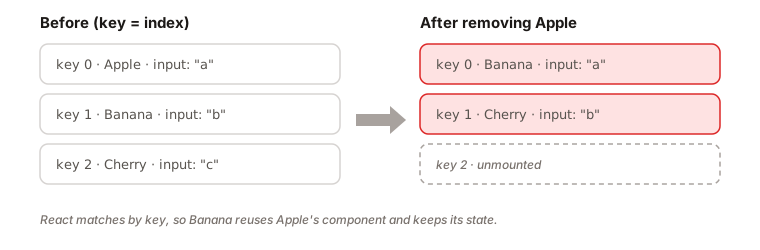
The list is now [Banana, Cherry], so the indexes are 0 and 1. React compares by key:
- Key
0existed before, and exists now. React keeps that component and updates its text from "Apple" to "Banana". But the input still contains "a". - Key
1existed before, and exists now. Cherry now shows up with the text "b". - Key
2is gone, so React removes the last component.
You deleted Apple, but React removed the last component and moved the remaining data onto the wrong state. The screen says "Banana" with Apple's text in the input. That's the classic index-key bug.
The fix: a stable, unique id
Use something that identifies the item, not its position. Usually that's an id from your data.
{fruits.map((fruit) => (
  <li key={fruit.id}>
    {fruit.name} <input />
  </li>
))}
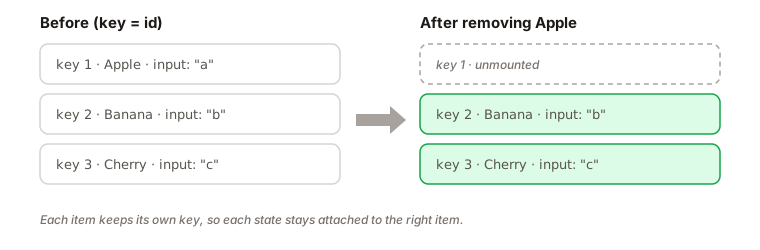
Now when Apple (id 1) is removed, React sees that key 1 is gone, so it removes that one component. Banana and Cherry keep their keys, so they keep their own state.
Where do good keys come from?
- Data from a server: use the database id.
- Data you create in the browser: create the id when the item is created, for example with a counter or
crypto.randomUUID(), and store it with the item.
The rules of keys
- Keys must be unique among siblings. They don't need to be unique across the whole app.
- Keys must be stable. The same item should get the same key on every render.
- Don't compute keys during render with something random.
keyis not passed to your component as a prop. If the component needs the value, pass it separately, likeid={todo.id}.
When is the index fine?
If the list is static (it never gets reordered, and items are never added or removed in the middle), and the items have no state, then the index is safe. A fixed list of navigation links is a good example. When in doubt, use an id.
Using key to reset state
Because a new key means a new component, you can use key on purpose to reset state. Say you have a profile editor with a draft form:
function ProfilePage({ userId }) {
  return <ProfileForm key={userId} userId={userId} />;
}
When the userId changes, the key changes. React discards the old ProfileForm, along with whatever the user had typed, and mounts a fresh one. This is often simpler than writing an effect that tries to clear each piece of state by hand. The key doesn't need to be on a list item. Any element can have one.
Examples
1. Inputs that swap text after a delete
{items.map((item, i) => (
  <Row key={i} item={item} />
))}
Problem: after deleting an item from the middle, the remaining rows show the right labels but the wrong input text, checkbox state or expanded/collapsed state.
Why: the key is the index, so each row's state is tied to its position. When items shift up, the state stays behind.
Fix: use the item's id.
{items.map((item) => (
  <Row key={item.id} item={item} />
))}
2. A component defined inside another component
function Page() {
  function Panel() {
    const [text, setText] = useState('');
    return <input value={text} onChange={(e) => setText(e.target.value)} />;
  }
  return <Panel />;
}
Problem: every time Page re-renders, the input loses its text.
Why: each render of Page creates a brand new Panel function. To React that's a different component type at the same position, so rule 2 applies: throw away the old one, state included.
Fix: define Panel at the top level of the file, outside Page.
3. Fresh form for each user
<ProfileForm userId={userId} />
Problem: the user clicks from "Ann" to "Bob", but the form still shows what you typed for Ann.
Why: it's the same component type in the same position, so React keeps its state.
Fix: add a key that changes with the user.
<ProfileForm key={userId} userId={userId} />
4. The key on a Fragment
{rows.map((row) => (
  <Fragment key={row.id}>
    <dt>{row.term}</dt>
    <dd>{row.description}</dd>
  </Fragment>
))}
Problem: the short syntax <>...</> can't take a key, so you get the missing key warning.
Why: a list of fragments is still a list, and each item needs an identity.
Fix: import Fragment from React and write it out in full, with the key on it.
Interview answer
The key prop is how React identifies items in a list between renders. During reconciliation, React compares the old and new element trees: the same type at the same position is updated in place, a different type is replaced, and for lists it uses keys to match old children to new ones. Keys should be stable and unique among siblings, ideally an id from the data. Using the array index breaks when items are reordered or removed, because state stays with the position instead of the item. You can also change a key on purpose to reset a component's state.
Summary
- Reconciliation is how React compares the previous and next element trees to decide what changes.
- Same type in the same position: React keeps the component and updates props.
- Different type in the same position: React destroys the old subtree and its state.
- State is attached to a position in the tree, not to the JSX in your code.
- In lists, keys give each item an identity so React can match items between renders.
- Keys must be unique among siblings and stable across renders.
- Prefer a stable id from your data. Create ids when items are created, never during render.
- Index keys are only safe for static lists. Otherwise state sticks to the wrong item.
- Changing a
keyresets a component's state. It's often simpler than an effect. keyis not a prop. React doesn't pass it to your component.