Why React StrictMode Renders Twice (and Why It's Not a Bug)
React Strict Mode is a development-only tool that runs extra checks on your components. The most visible one is that React renders every component twice and runs every effect one extra time, so that bugs caused by impure code show up while you're building instead of in production.
If you've ever put a console.log in a component and seen it print twice, this is almost certainly why. Nothing is broken. React is testing your code on purpose.
How you turn it on
Most starters (Next.js, Vite templates, Create React App) already wrap your app like this, or give you a setting that does it:
import { StrictMode } from 'react';
import { createRoot } from 'react-dom/client';

createRoot(document.getElementById('root')).render(
  <StrictMode>
    <App />
  </StrictMode>
);
You can also wrap only part of your app. StrictMode has no visual output, and it only affects the components inside it.
The idea: rendering should be a pure calculation
Before we look at what Strict Mode does, we need one idea: rendering has to be pure.
A pure function is one where the same input always gives the same output, and nothing else changes along the way. React expects your component to work like that. Given the same props, state and context, it should return the same JSX, and it shouldn't change anything outside itself while it renders.
Why does React care? Because React may call your component whenever it likes: to re-render after a state change, to prepare an update in the background, or to throw an attempt away and start again. If your component secretly changes something outside itself every time it's called, the result depends on how many times React happened to call it. That's unpredictable.
So how does React check that you followed the rule? It calls your component twice and compares. A pure component can't tell the difference. An impure one gives itself away.
Step by step: what Strict Mode does
In development, with <StrictMode> around your app, React does three extra things.
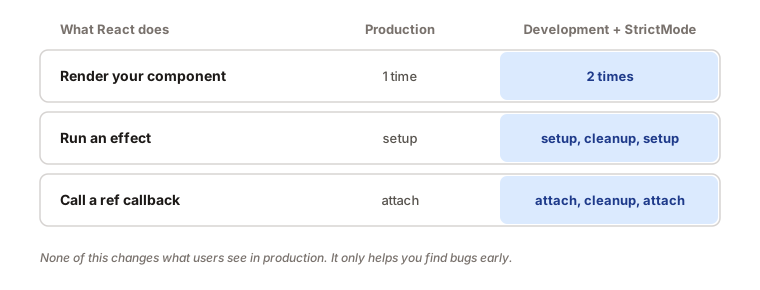
- It renders your components twice. React calls your component function a second time. The result of the second call is thrown away (or the first one is), so the screen only shows one result. This finds impure rendering.
- It runs effects one extra time. After the component mounts, React simulates it being removed and added back: setup, cleanup, setup. This finds missing cleanups. (We cover the details in the useEffect cleanup guide.)
- It runs ref callbacks one extra time. The same idea applies to ref callbacks: attach, cleanup, attach. This finds missing ref cleanup.
All of this only happens in development. In a production build, React renders once and runs each effect once.
Double render: finding impure components
Here's a classic bug. The component below hands out a guest number, using a variable that lives outside the component:
let guestCount = 0;

function Guest() {
  guestCount = guestCount + 1; // changes something outside the component
  return <h2>Guest #{guestCount}</h2>;
}
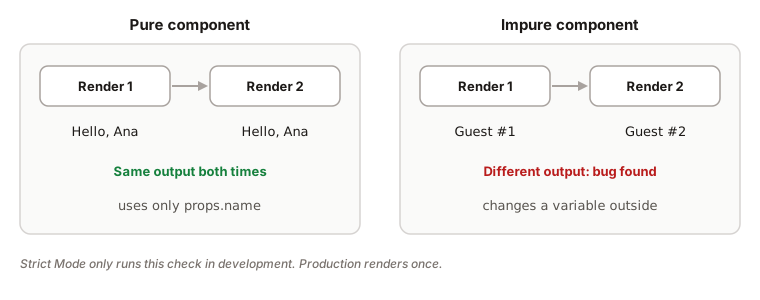
Without Strict Mode, the first guest is "Guest #1". With Strict Mode, React calls Guest twice, so the counter goes from 0 to 2 and the screen shows "Guest #2". The component's output now depends on how many times React happened to call it, and that's the bug Strict Mode wants you to see.
The fix is to pass the value in, so the component only uses its inputs:
function Guest({ guestNumber }) {
  return <h2>Guest #{guestNumber}</h2>;
}

// The parent decides the number
<Guest guestNumber={1} />
<Guest guestNumber={2} />
Now, no matter how many times React calls Guest, the same props give the same output.
What counts as impure?
| Impure (avoid during render) | Pure (fine during render) |
|---|---|
| Changing a variable declared outside the component | Changing a variable you created inside this render |
Mutating props or state directly (items.push(x)) | Making a new array or object ([...items, x]) |
Reading Math.random() or Date.now() and showing it | Passing the random value in as a prop, or storing it in state |
| Fetching data or writing to the DOM | Calculating JSX from props and state |
The middle ground is worth knowing: creating a new array inside your component and filling it up is fine. That's called local mutation, because the value was born during this render and nobody else can see it.
Extra effect run: finding missing cleanups
Strict Mode also checks your effects. It mounts the component, unmounts it, and mounts it again, so each effect runs setup, cleanup, setup.
useEffect(() => {
  const connection = createConnection(roomId);
  connection.connect();
  // no cleanup: the first connection is never closed
}, [roomId]);
Without a cleanup, development now opens two connections, and you see the problem right away. In production, the same bug would show up later, for example every time the user opens and closes the chat panel. The fix is the same as always: an effect needs a matching undo.
useEffect(() => {
  const connection = createConnection(roomId);
  connection.connect();
  return () => connection.disconnect();
}, [roomId]);
With the cleanup in place, setup, cleanup, setup ends up with exactly one open connection, and the extra run changes nothing.
What it means when something breaks
When your code behaves differently under Strict Mode, treat it as a free bug report. Ask yourself where the code belongs:
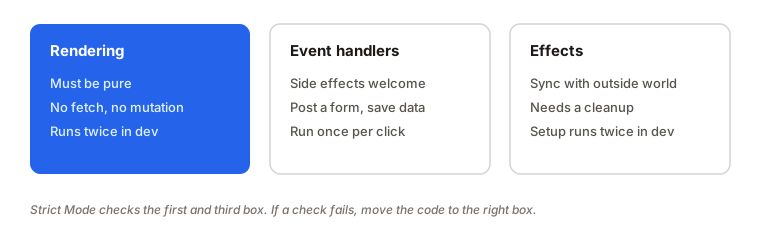
- Rendering only calculates JSX from props, state and context.
- Event handlers are where things happen because a user did something: saving a form, sending a request, updating a counter. They run once per click, and Strict Mode doesn't repeat them.
- Effects keep your component in sync with something outside React, and they always need a cleanup.
Usually the fix is to move the code into the right box.
Examples
1. A log that prints twice
function Profile({ user }) {
  console.log('rendering', user.name);
  return <h1>{user.name}</h1>;
}
Problem: the console shows "rendering Ana" two times.
Why: Strict Mode called Profile twice. Logging is harmless here, but it's a good reminder that render can run more than once.
Fix: nothing needs fixing. If the extra logs bother you, don't count renders as events. If you need to run code once when something happens, use an event handler or an effect.
2. Pushing into a state array
function Cart({ items }) {
  items.push({ id: 'free-gift' }); // mutates the prop
  return <List items={items} />;
}
Problem: the free gift appears twice in development, and it may be added again on every re-render in production.
Why: push mutates the array you received. Calling the component twice mutates it twice.
Fix: build a new array and leave the original alone.
function Cart({ items }) {
  const withGift = [...items, { id: 'free-gift' }];
  return <List items={withGift} />;
}
3. A subscription that leaks
useEffect(() => {
  window.addEventListener('resize', handleResize);
}, []);
Problem: in development, two listeners are registered, and none are removed when the component goes away.
Why: there's no cleanup, so the extra setup stacks on top of the first one.
Fix: return a cleanup that removes the same function.
useEffect(() => {
  window.addEventListener('resize', handleResize);
  return () => window.removeEventListener('resize', handleResize);
}, []);
4. A random value in render
function Banner() {
  const id = Math.random();
  return <div id={id}>Welcome</div>;
}
Problem: the value changes on every render, so it's different each time React calls the component.
Why: Math.random() isn't pure: the same inputs give different outputs.
Fix: if you need a stable id, use the useId hook. If you need a random value, create it once in state or in an event handler.
Should you turn it off?
No. Strict Mode costs nothing in production, and the bugs it finds are real ones. The right reaction to a double run is to fix the code, not remove the wrapper. Keep it on for the whole app, and if you're adding it to an old codebase, you can wrap one section at a time and fix issues as you go.
Interview answer
Strict Mode is a development-only wrapper that helps find bugs. It renders components twice to check that rendering is pure, meaning the same props, state and context always produce the same output. It also runs effects and ref callbacks one extra time, with setup, cleanup, setup, to find missing cleanups. It doesn't affect production, and if something breaks, the fix is to make the render pure or add a proper cleanup, not to remove Strict Mode.
Summary
- Strict Mode is a development-only tool. It doesn't change production builds.
- It renders components twice to check that rendering is pure.
- It runs effects setup, cleanup, setup to find missing cleanups.
- It re-runs ref callbacks once more to find missing ref cleanup.
- A pure render gives the same output for the same props, state and context.
- Changing outside variables, mutating props or state, and using
Math.random()during render are all impure. - Creating and changing a value inside the same render (local mutation) is fine.
- Side effects belong in event handlers or effects, not in render.
- Don't use a ref flag to hide the double run. Write a correct cleanup instead.
- A double run is a bug report, not a bug in React. Fix the code and keep Strict Mode on.