useActionState, useOptimistic and useFormStatus Explained
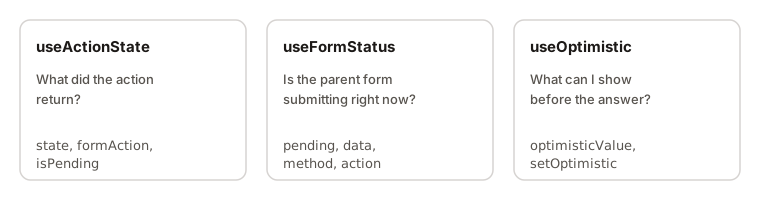
useActionState keeps the result of an action, such as a form submission, as state. useOptimistic shows a temporary value while that action is still running. useFormStatus lets a component inside a form know whether the form is submitting. Together they are the React 19 way to build forms.
I'm covering all three on one page because they solve one problem from three sides: what should the screen show while a form is being sent?
The idea: forms with actions
In React 19, you can pass a function to a form's action prop instead of writing an onSubmit handler:
<form action={saveName}>
  <input name="name" />
  <button>Save</button>
</form>
When the form is submitted, React calls your function with the form's FormData. A function used like this is called an action.
An action is usually async, since it talks to a server. While it runs, you need answers to three questions:
- What did the action return? An error message? A success note? That's
useActionState. - Is it still running? A nested button wants to disable itself. That's
useFormStatus. - Can I show the result early? Add the new comment to the list right now. That's
useOptimistic.
useActionState: keep the result of an action
const [state, formAction, isPending] = useActionState(action, initialState);
It returns three things:
state: the latest result. Before the first submit, it'sinitialState.formAction: a wrapped version of your action. Pass this to<form action>, not your original function.isPending:truewhile the action is running.
Your action receives two arguments: the previous state first, then the FormData.
async function signup(previousState, formData) {
  const email = formData.get('email');
  const res = await fetch('/api/signup', { method: 'POST', body: email });

  if (!res.ok) return { error: 'Could not sign you up' };
  return { error: null };
}

function SignupForm() {
  const [state, formAction, isPending] = useActionState(signup, { error: null });

  return (
    <form action={formAction}>
      <input name="email" type="email" />
      <button disabled={isPending}>Sign up</button>
      {state.error && <p>{state.error}</p>}
    </form>
  );
}
Step by step:
- React renders the form with
state = { error: null }. - The user submits. React calls
signupwith the previous state and the form's data. - While
signupis awaiting,isPendingistrue. - Whatever
signupreturns becomes the newstate, and the form re-renders.
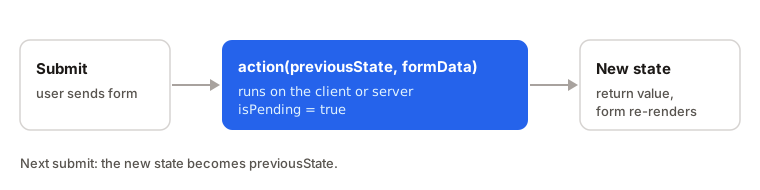
Because the previous state comes in as the first argument, this works like a reducer: the new state can be built from the old one. If the action runs several times in a row, React queues the calls and passes each result to the next call as the previous state.
The permalink argument
There's an optional third argument, permalink. It matters for server-rendered forms: if the action is a Server Function and the user submits before the JavaScript has loaded, the browser navigates to that URL instead of staying on the current page. You can ignore it for client-only forms.
useFormStatus: read the form's status from a child
import { useFormStatus } from 'react-dom';

function SubmitButton() {
  const { pending } = useFormStatus();
  return <button disabled={pending}>{pending ? 'Saving...' : 'Save'}</button>;
}
useFormStatus returns an object with pending, data, method and action. pending is true while the parent form is submitting. data is the submitted FormData during a submission and null otherwise.
The important rule: the component that calls it must be rendered inside the form. It reads the status of a parent form. If there's no form above it, pending is always false.
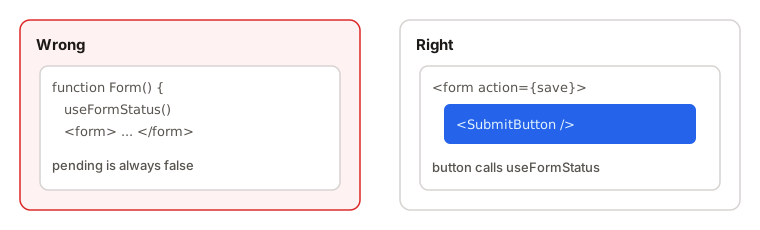
That's why SubmitButton is its own component. Calling useFormStatus in the same component that renders <form> gets you nothing.
useOptimistic: show the result before it arrives
An optimistic update means you show the expected result immediately, and fix it later if the server disagrees.
const [optimisticValue, setOptimistic] = useOptimistic(value, reducer?);
You give it the real value. It gives back an optimisticValue to display, and a function to change it. The optimistic value is only used while an action is pending. When the action finishes, React shows value again.
function Messages({ messages, sendMessage }) {
  const [optimisticMessages, addOptimistic] = useOptimistic(
    messages,
    (current, newText) => [...current, { text: newText, sending: true }]
  );

  async function action(formData) {
    const text = formData.get('text');
    addOptimistic(text);
    await sendMessage(text);
  }

  return (
    <>
      {optimisticMessages.map((m, i) => (
        <p key={i}>{m.text} {m.sending && '(sending...)'}</p>
      ))}
      <form action={action}>
        <input name="text" />
        <button>Send</button>
      </form>
    </>
  );
}
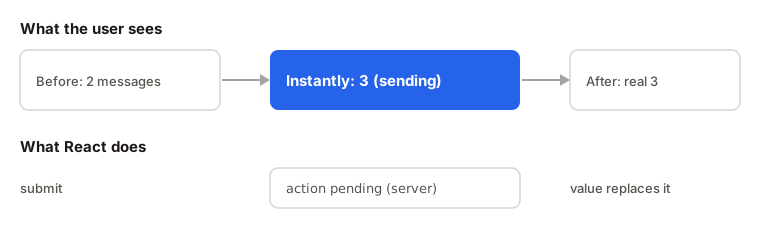
What happens:
- The user submits.
addOptimisticadds the message to the list instantly, marked "sending". sendMessageruns in the background.- When it finishes, the parent passes down a new
messagesarray, and React shows that real value instead. - If the action throws, the parent's
messagesnever changed, so the UI goes back to what it showed before.
The reducer must be pure: take the current state and the update, return the next state.
Examples
1. The optimistic update that disappears
function onClick() {
  addOptimistic('hello'); // called in a plain click handler
}
Problem: the new item flashes on the screen and instantly vanishes.
Why: the optimistic state only lasts while an action or transition is pending. Called outside one, there's nothing to wait for, so React reverts right away.
Fix: call the setter inside a form action, or inside startTransition.
2. The spinner that never spins
function Form() {
  const { pending } = useFormStatus();
  return (
    <form action={save}>
      <button disabled={pending}>Save</button>
    </form>
  );
}
Problem: pending is always false.
Why: the component calls useFormStatus but is the one rendering the <form>. The hook reads a parent form, and there isn't one.
Fix: move the button into its own component and render that inside the form.
3. Reading state in the wrong argument
async function signup(formData) {
  const email = formData.get('email'); // TypeError
}
const [state, formAction] = useActionState(signup, null);
Problem: formData.get is not a function.
Why: with useActionState, the first argument is the previous state. The FormData is second.
Fix: write async function signup(previousState, formData).
Interview answer
In React 19, a form can take a function as its action. useActionState runs that action and stores its result as state: it returns the state, a wrapped action for the form, and an isPending flag, and the action receives the previous state and the FormData. useFormStatus lets a component nested inside a form read whether it's submitting, and it only works in a child of the form. useOptimistic shows a temporary value while the action is pending, and React switches back to the real value when it finishes or fails.
Summary
- A function passed to
<form action>is called an action and receives theFormData. useActionState(action, initialState)returns[state, formAction, isPending].- With
useActionState, the action gets previous state first, thenFormData. - Pass the wrapped
formActionto the form, not your original function. - Repeated calls are queued, and each result becomes the next previous state.
useFormStatusis imported fromreact-domand returnspending,data,methodandaction.useFormStatusmust be called from a component rendered inside the form, orpendingstaysfalse.useOptimistic(value, reducer?)shows a temporary value only while an action is pending.- If the action fails, the optimistic value goes away and the UI shows the real value.
- Call the optimistic setter inside an action or transition, or it reverts immediately.